June 2015 I sketched foreseen legal actions impacting on cybercrime. I posted a diagram-infographic in Feb 2016 "LEGALLY SPEAKING – OBSERVATIONS CHART FOR JUDGES BARRISTERS AND SOLICIT0RS" - http://trewmte.blogspot.co.uk/2016/02/threatware-legally-speaking.html.
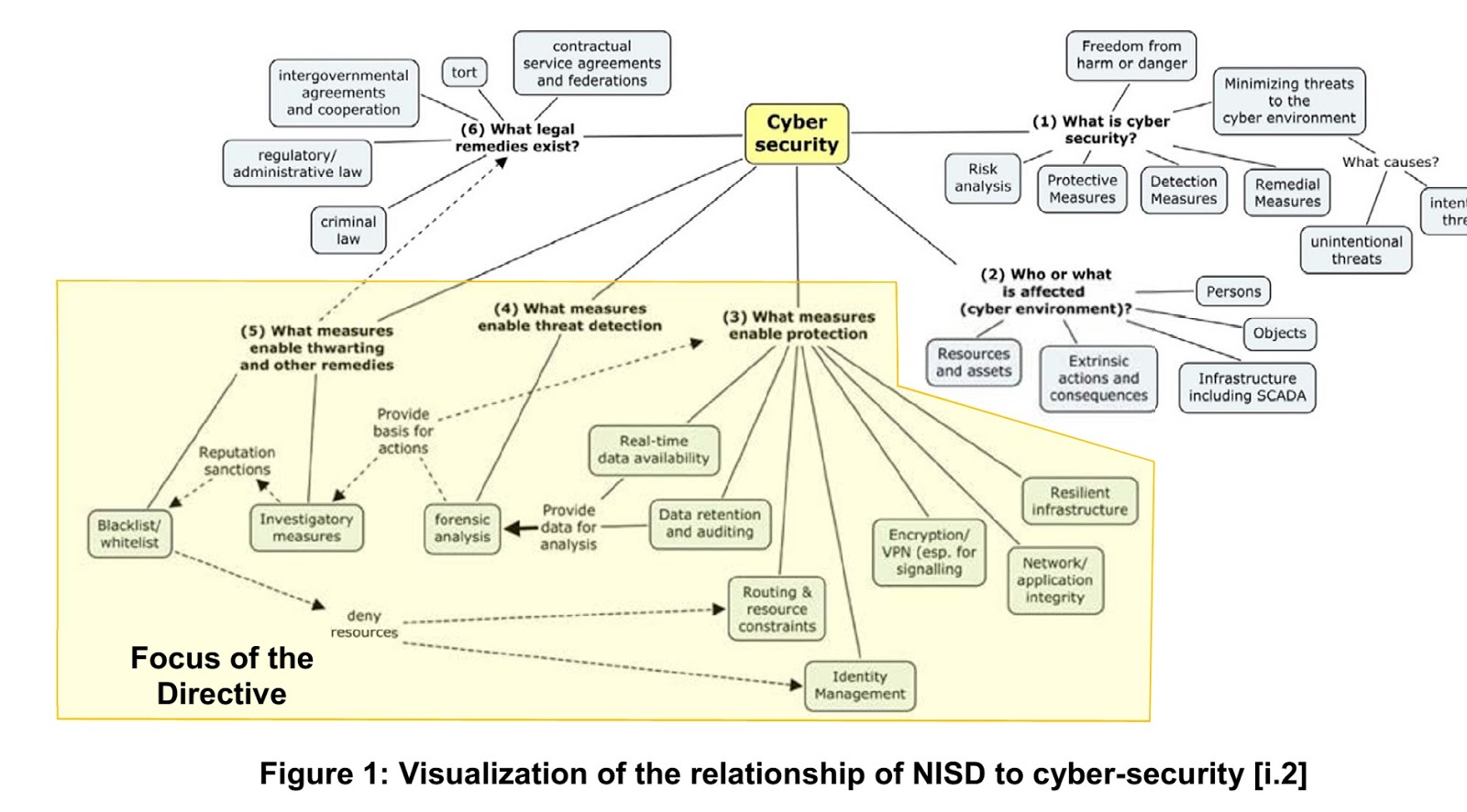
I am pleased to see that ETSI (European Telecommunications Standards Institute) have also picked up on my themes in their 2017 published technical report (TR) CYBER; Implementation of the Network and Information Security (NIS) Directive ETSI TR 103 456 V1.1.1 (2017-10) with reference to Contract, Tort and Crime.
Investigations, Practices and Procedures: Seizure-Forensic Examination-Evidence. Cellular and Satellite Telephones, Call Records-Billing Data, Cell Site Analysis. Telecomms. Computer and Network Analysis. GPS devices & Jammers, Cyber, IoT forensics.
Showing posts with label cybercrime. Show all posts
Sunday, October 29, 2017
Friday, April 14, 2017
Cyber-teaching: bite-size learning No:5
Advanced Threat Analytics (ATA) may sound quite off-putting if your organisation is a small-to-medium sized enterprise (SME). What does ATA do? Microsoft latest playbook (2017) creates a simulation learning environment where IT administrators for servers and computers can train and gain experience in searching for clues where attack (infiltration) to a network/s has occurred. Take it that it offers a primer allowing admins to play around and gain experience to find artefacts (entry points, failed privileges ...etc.).
Microsoft ATA Playbook defines this FREE publication as "This article will walk through the credential theft attack techniques by using readily available research tools on the Internet. At each point of the attack we will show how Microsoft’s Advanced Threat Analytics (ATA) helps IT organizations gain visibility into these post-infiltration activities happening in their environments.
What SMEs should appreciate at first instance is that it hasn't cost anything to find out. More importantly, with this enhanced knowledge it may assist when IT departs to investigate, but understanding and analysing post-infiltration techniques might still requires securing evidence in a sound manner; cyber investigation is just one aspect, forensic acquisition of evidence showing cyber attack is another.
Advanced Threat Analytics Attack Simulation Playbook 2017
Terms and Conditions of Use:
https://gallery.technet.microsoft.com/ATA-Playbook-ef0a8e38
Sunday, April 02, 2017
Crime: Base Station Monitoring and Regular Stress Tests
Photo courtesy of the Macau Post Daily
There is no shortage of police investigations, articles and reports into cellular technology being used for some sort of illegal purposes, and that is beyond the normal seizure of mobile devices in criminal proceedings. The recent prosecution of a construction worker, reported (10-03-2017) in the Macau Post Daily, running not one but two fake base stations, is such an example.
Whilst there is a huge effort to deal with Cybercrime attacks over networks, there is a growing emphasis suggesting that more attention could be focussed to actually dealing with physical devices creating the cyber activity behind the crime.
On the 22-03-2017 Information Age website reported Chinese cybercriminals sent Android malware via fake BTSs ( http://www.information-age.com/chinese-cybercriminals-use-fake-telecom-stations-spread-malware-123465203/ ). The report was also mentioned at a number of other websites ( http://thehackernews.com/2017/03/rogue-bts-android-malware.html ; https://blog.knowbe4.com/chinese-hackers-use-fake-cellphone-tower-to-spread-android-banking-trojan and so on). Blog.knowbe4 added useful information content beyond Information Age's report that the malware was involved, but identifies the malware as attack called "Smishing"; a subject mentioned here at trewmte.blogspot.com previously back in 2015 ( Smishing Maybe Smashed, but Fake Tache Goes On - http://trewmte.blogspot.co.uk/2015/04/smishing-maybe-smashed-but-fake-tache.html ).
It isn't clear from these reports as to what is actually meant by 'fake BTSs'? Are the attackers merely hacking the network exploiting (S3000688) MAP security and getting hold of authentication vectors to mount a false base station attack?; maybe this is a man-in-the-middle attack using a false mobile BTS? (3GPP TS 21.133); using mobile redirector techniques for Android smartphones opening the SMS text message link to download the '.apk'; or whether a false physical tower has been erected on land through which the attacks are made? If the latter is correct, there is more involved with this than anonymously hiding in the background. For a false physical tower to happen either the attacker/s might 'hijack' equipment on an existing tower?; add new equipment to an existing tower?; or land-base a whole new tower? The latter is possibly the most improbable to happen without the attacker/s needing new landline connections, microwave, RF and electrical power facilities, cabinets, cabling, tower rig, antenna/TRXs, etc. etc., something that resembles a cellular tower in order to get a smartphone to use its rogue radio coverage.
How can a mobile network operator deal with this? It largely depends how well the operator knows its own installation base and how regularly the operator OMC (operations and maintenance centre) and site visits are co-ordinated for stress testing. Those co-ordinated tests may need to take into account site inventory inspection across a wide range of components. For instance, has the operator sufficient information of Inventory of components for each site? One example being the Antenna Interface Standards Group (AISG), which has been around for many years, its members count amongst some of the leading global players in this arena ( http://www.aisg.org.uk/ ):
Membership of the Group at 1st May 2016
| Ace Technologies Corp. |
Kathrein Werke KG
|
Amphenol Antenna Solutions
| KGP Tech Co. Ltd. |
China Mobile
|
KMW Inc.
|
Comba Telecom Systems Int'l
|
Nokia
|
Commscope, Inc
|
NXP
|
Communications Components Inc.
|
Orange / France Telecom
|
Ericsson AB
| Oriel Laboratories Ltd |
| Galtronics Corporation Ltd |
Radio Design
|
Gammanu Inc
|
RFS Inc
|
Gemintek Corporation
|
RFM Wireless
|
| Gemtek Technology Co. Ltd. |
Rosenberger Asia Pacific Electronic Co. Ltd.
|
Guangzhou Sunrise Telecoms Equipment Co Ltd
|
SGC Technologies Inc
|
Heji Co Ltd.
|
Shenzhen Haina Telecom Equipment Co Ltd
|
Huawei Technologies Co Ltd
|
Shenzhen Tatfook Technology Co Ltd.
|
Innertron Inc
|
Sunsea Telecommunication Co Ltd.
|
Innova Telecommunication Co. Ltd.
|
Sunwoo Communication Co Ltd
|
Jiangsu YaXin Electronics, Science & Technology Co Ltd
| Wuhan Hongxin Telecommunication Technologies Co. Ltd. |
JMA Wireless LLC
|
Tongyu Communications Equipment Co Ltd
|
Kaelus Pty Ltd
| Westell, Inc. |
| The following companies are members of the Ancillary Equipment Group | |
| Amphenol-Tuchel GmbH | Recodeal Interconnect System Co. Ltd. |
| Franz-Binder GmbH | Sam Woo Electroncs Co. Ltd. |
| Guangzhou Huafeng Qiwang Electronic Technology Co. Ltd. | Syskim International |
| Lumberg Connect GmbH | |
Furthermore, the obvious site checks, such as, break-in to an external cabinet or site equipment room, checking CCTV and trip alarms should normally be examined against regular site visit logs and also time-to-site and time-at-site. Checking fault management, configuration management, performance management & Security Management ports and panels at site to see if they have not been tampered with to disguise normal operation is another consideration. There is a full range of security measures at site and network stress tests that can be performed.
Regulators may wish to assess the security breach with an operator and see if an industry-wide practice is involved selling equipment on the merits on merely the forecast of Total Cost of Ownership and Return On Investment as opposed to an assessment of the person/organisation buying equipment? Another assessment might be to considered reports of stolen equipment and marking of components etc.
It isn't difficult to imagine more cases like the above could occur but it doesn't mean it will; and doom and gloom is not the note this discussion is going to end. Think about all of the towers and base station installed around the world and the customer-base they serve. The mobile network operators provide an amazing service delivering trillions of calls, communications and other services annually. It is a testament to their predominantly well run mobile networks that they operate that the majority of users will not be talking in terms of throwing in the towel and ditching their mobiles tomorrow for landline telephones because of these crime reports.
Finally, India's state-owned quality control agency, Standardisation Testing & Quality Certification (STQC), has started ( http://economictimes.indiatimes.com/news/company/corporate-trends/india-to-start-screening-imported-telecom-gear-from-april-2017/articleshow/56054263.cms ) screening of all mobile network components, feature phones and smartphone under the requirements of National Security. This may pave the way for other countries without such a screen procedure to adopt a similar model.
Wednesday, March 29, 2017
C-t: Malware: bite-size learning No.4
If you have followed the Cyber-teaching (C-t) bite-size learning module hopefully you will have noticed several references on things that you can do to help yourself as single-person and small businesses and other SME categories. Further proof that these types of business need to think on their feet and act quickly is making sure you have backed up your data (files, etc.). The obviousness of this will be apparent quite shortly.
Initially, we need to look at attackers and tools of threat. Those who digitally attack your business look for the weakness in your security. They are looking at this:
The methods adopted for the attacker tools of threat can be in plain sight (email attachment, etc.,) or by stealth (unseen downloads when visiting webpages) are malware that can be inconvenient/ annoying/ threats to person's reputation; to ransomware (demanding monies with menaces to PC/laptop).
If your PC/laptop becomes infected then you will find there are some very helpful and talented companies out there that can provide free solutions to dealing with malware. The company I selected is Emsisoft ( https://decrypter.emsisoft.com/ ). When you visit their webpage have a look at all the malware decryption tools the company has created for malware file victims (MFV). In particular, note the number of downloads for malware tools, which give a clear indication which malware is more prevalent in the marketplace.
Decrypter for LeChiffre
Decrypter for KeyBTC
Decrypter for Globe2
Decrypter for NMoreira or XRatTeam or XPan
Decrypter for OpenToYou or OpenToDecrypt
GlobeImposter Decrypter
Decrypter for MRCR
Decrypter for Globe3
Decrypter for Marlboro
Decrypter for OpenToYou
Decrypter for GlobeImposter.
Decrypter for Stampado
Decrypter for Fabiansomware
Decrypter for Philadelphia
Decrypter for FenixLocker
Decrypter for Al-Namrood
Decrypter for Globe ransomware
Decrypter for OzozaLocker
Decrypter for Nemucod
Decrypter for DMALocker2
Decrypter for HydraCrypt
Decrypter for DMALocker
Decrypter for CrypBoss
Decrypter for Gomasom
Decrypter for Harasom
Decryptor for Xorist
Decryptor for 777
Decryptor for BadBlock
Decryptor for Apocalypse
Decrypter for ApocalypseVM
Decrypter for Radamant
Decrypter for CryptInfinite
Decrypter for PClock
Decrypter for CryptoDefense
Those who are familiar with using the PCs/laptop and the desktop facilities may not be so familiar with the technical operation and tend to be put off from investigating, instead hoping that the antivirus / malware detection cleaner will resolve the problem. In part they do, but they do not decrypt malware file victims (MFV). This is why I chose Emsisoft decryption tools because the function of decrypting is very easy to follow, such that as a user:
1) As you are familiar creating a folder on a desktop: you can create a folder on a USB stick;
2) You know how to download a program;
3) You know how to copy and paste;
4) You know how to move a file from location to another.
You may recall previously it was mentioned about "back-up your data"? And here is one reason for that. For the Emsisoft decryption tool to work it needs a) an original file b) the malware file victim (MFV) in order to conduct its decryption process.
Quite simply:
5) Create a folder on a USB stick (e.g. Malware Test);
6) Download a copy of the relevant decryption tool (determined by the file-extension of the infected file (MFV) and cross-referenced to the tool at Emsisoft website;
7) Copy and paste the original file into the folder;
8) Move the infected file (MFV) into the folder;
9) Highlight both the files (original and MFV);
10) Drag and drop both files on the decryption tool icon and the program runs itself.
Always read and follow the decryption tools instructions.
Remember to run your antivirus/malware detection cleaner programs on your PC/laptop and don't forget to do the same for the USB stick.
Lastly, there are no guarantees that decryption or release tools will work or it might be tools may not have been created for malware, so keep hunting and be patient.
Where fake programs are present holding a user to ransom that require input of release keys the professionals have noted a number of frequently common keys to unlock that have been used:
Master Boot Record Blocking Keys Unlock Codes:
- Pwn8
- 721A
- g81A
- wb8A
- oc8A
- Gd8A
- Wf8A
- lc5L
- Og8A
- 7j8A
- 7r9A
- gx9A
- xmnL
- XqnL
- prnL
- hsnL
- 8unL
- PvnL
- HwnL
- 0znL
- XapL
- pbpL
Frequent common keys unlock codes:
0W000-000B0-00T00-E0020
0W000-000B0-00T00-E0021
AA39754E-715219CE
Y78REW-T54FD1-U2VCF4A
Y86REW-T75FD5-U9VBF4A
Y68REW-T76FD1-U3VCF5A
Y76REW-T65FD5-U7VBF5A
xOxZxLxWxIxTxFxQxCxNxYxKxVxHxSxE
3425-814615-3990
1089-903874-1875
08467206738602987934024759008355
08869246386344953972969146034087
8F42D6E3-FD18
9992665263
9443-077673-5028
9YW1-KI7D-V7GG2
56723489134092874867245789235982
U2FD-S2LA-H4KA-UEPB
15801587234612645205224631045976
LIC-99D0-1239-KJAS-354S-SQD4-CJKF-KF67-GJ78-FGHK-ZDU6
LIC2-00A6-234C-B6A9-38F8-F6E2-0838-F084-E235-6051-18B3
64C665BE-4DE7-423B-A6B6-BC0172B25DF2
D13F-3B7D-B3C5-BD84
1203978628012489708290478989147
8945315-6548431
DB038748-B4659586-4A1071AF-32E768CD-36005B1B-F4520642-3000BF2A-04FC910B
8475082234984902023718742058948
MTk4-NzE1-NTYx-NTUw
2233-298080-3424
SL55J-T54YHJ61-YHG88
64C665BE-4DE7-423B-A6B6-BC0172B25DF2
?O?Z?L?W?I?T?F?Q?C?N?Y?K?V?H?S?E
As a reminder using these keys wont clean your PC/laptop, you will still need to run antivirus/malware detection cleaner programs.
These C-t: bite-size learning modules are free of charge. They are based upon research and surveillance in the marketplace to help others. There is no connection with the companies or their products.
Cyber-teaching: bite-size learning No.3
When suggesting 'practising security' it is meant adopting practical procedures users can do. For instance, does your PC/laptop need to be "always on"? That is constantly connected to the internet? Could you not switch off 'WiFi' until you need it or put the wireless settings into 'Pilot Mode' or remove the telecom plug from the PC/laptop until you are ready to go on line again?
How do you conduct malware (virus/ransomware/etc.) testing? Only on email attachments? What about USB sticks connected to the PC/laptop? Have you ever thought of getting a second-hand PC/laptop with free malware/phishing software on it and only use that for internet connectivity which contains no business information or important data. If the user then practises using the second-hand PC/laptop only dealing with internet access, emails/attachments and USB connections then if free malware etc programs don't work and your machine is held hostage then what the heck. Just wipe the drive clean and start again: 10 Alternative PC Operating Systems You Can Install ( https://www.howtogeek.com/190217/10-alternative-pc-operating-systems-you-can-install/ ).
One useful publication costing just £0.99 (yes, 99-pence) is available from amazon and published by PeerLyst - Second Community eBook: Essentials of Cybersecurity ( https://www.peerlyst.com/posts/second-community-ebook-essentials-of-cybersecurity-limor-elbaz?trk=post_page_ebook_ad ).
If you believe your skillsets are sufficient to understand networks, as well, then here is a publication which is FREE and can be downloaded by way of the internet called Cybersecurity for Dummies ( http://www.redcentricplc.com/media/2632/cybersecurity-for-dummies.pdf )
Moreover, the British Government hosts a webpage called "Cyber security guidance for business" ( https://www.gov.uk/government/collections/cyber-security-guidance-for-business ) which is full of free and helpful advice and where to get help.
Cyber-teaching: bite-size learning No.2
We are told there are many millions of PCs/Laptops bleeding information, leaking details (about devices, their operations and data) on to the world wide web (WWW). That being so, it must generate voluminous traffic (in addition to the payload it brings to the receiving party). This suggests to me that, today, in my view, it might justify the WWW being also titled the "information-spillage superhighway".
We are also told we're not doing enough to control the flow (egress) of information from out devices. That could be because for some it is not easy changing mind-sets at the flick of a switch. Some basic information is needed to help us understand what to look out for on our PCs/Laptops.
I mentioned about bite-size learning (No.1) when cyber-teaching to assist cyber-discovery for those who are non technical, technology-savvy, or over-whelmed with technical presentation. The Graphical Network Monitor shown yesterday is a useful graphical user interface (GUI) to present static presentation of programs and connections that programs can make externally to the PC/Laptops, etc. and externally to the organisation (WWW).
There are many built-in software tools within operating systems but for the less knowledgeable they may not be aware. Sometimes when cyber-teaching it can be helpful to show how an external program (e.g. ESET SYSINSPECTOR) can extract the tool information from the PC/Laptop to illustrate, for instance, "active programs" at the system level that are communicating with the outside world whilst the user PC/Laptop is powered up and logged on.
So the user has already seen previously "the GUI" and now can see how harvested information via SYSINSPECTOR can be obtained about active programs on the PC/Laptop. Looks too technical? May be not. Everything in life is a state of mind; the more complex you think something is, the more you convince yourself it is difficult. Changing that state of mind requires perhaps using imaginative ideas to present the so-called complex and difficult into an ordinary, everyday common practice which people are familiar. In this case, the photo image could be described and read as if it were a food cooking recipe.
The SYSINSPECTOR program is your recipe book showing various recipes. At the top the filtering (which is a risk indicator) can be set the same way one would set the temperature on the oven. Metaphorically speaking, the riskier the program, the higher the cooking temperature (food burns).
The highlighted program (in green) is a recipe you didn't realise was in the book. The recipe is not good for you because it has an ingredient in it that you have an allergic reaction (nut); it is a high risk to you and needs to be quarantined or removed. Importantly, you need to know whereabouts in the recipe the ingredient, which can cause allergic reaction, is located; this is found the program processes (top right-hand pane). Finally, you need to know if the ingredient is active to make the recipe work? Can it be substituted with something safer? If not, should you switch it off and remove the program (showing the status in the bottom right-hand pane)?
I am not suggesting you should follow the above, just illustrating that cyber-teaching does require using varying techniques to get the message across.
So the next step forward? Can you help others know which are safe programs and which are not? Can you show others how to switch off an offending program and then remove it?
In closing, there are a number points about my observations in this discussion I would like to raise with you:
1) In writing these bite-size discussions I am not telling you what to do or selling anything; nor am I selling any teaching (this is free here). I do not work for or on behalf of any of the organisations mentioned.
2) Single-person businesses and self-employed and SMEs do not have a fortune to spend and cannot bank-roll vast monitoring services.
3) The above workplaces need cost-effective methods.
4) The two programs identified in this bite-size discussion: the GUI costs approx. £Sterling (£4.00), but there are other free versions, and the other(SYSINSPECTOR) is free of charge. Again there are other tools out there that can do a similar job, too. Remember these are what we call starting-point tools to introduce a subject matter and assist comprehension.
5) There are a wide range of programs out there that monitor in 'static' and 'live' modes (and that is important, too) but this discussion is about awareness, first, and then strengthening your knowledge thereafter.
6) The tools discussed can be installed and run from a USB stick.
7) Before changing anything on your PC/Laptop get hold of a second-hand PC/Laptop and play around until you feel comfortable with making changes to your own PC/Laptop.
8) Remember to always back-up your data etc. first.
We are also told we're not doing enough to control the flow (egress) of information from out devices. That could be because for some it is not easy changing mind-sets at the flick of a switch. Some basic information is needed to help us understand what to look out for on our PCs/Laptops.
I mentioned about bite-size learning (No.1) when cyber-teaching to assist cyber-discovery for those who are non technical, technology-savvy, or over-whelmed with technical presentation. The Graphical Network Monitor shown yesterday is a useful graphical user interface (GUI) to present static presentation of programs and connections that programs can make externally to the PC/Laptops, etc. and externally to the organisation (WWW).
There are many built-in software tools within operating systems but for the less knowledgeable they may not be aware. Sometimes when cyber-teaching it can be helpful to show how an external program (e.g. ESET SYSINSPECTOR) can extract the tool information from the PC/Laptop to illustrate, for instance, "active programs" at the system level that are communicating with the outside world whilst the user PC/Laptop is powered up and logged on.
So the user has already seen previously "the GUI" and now can see how harvested information via SYSINSPECTOR can be obtained about active programs on the PC/Laptop. Looks too technical? May be not. Everything in life is a state of mind; the more complex you think something is, the more you convince yourself it is difficult. Changing that state of mind requires perhaps using imaginative ideas to present the so-called complex and difficult into an ordinary, everyday common practice which people are familiar. In this case, the photo image could be described and read as if it were a food cooking recipe.
The SYSINSPECTOR program is your recipe book showing various recipes. At the top the filtering (which is a risk indicator) can be set the same way one would set the temperature on the oven. Metaphorically speaking, the riskier the program, the higher the cooking temperature (food burns).
The highlighted program (in green) is a recipe you didn't realise was in the book. The recipe is not good for you because it has an ingredient in it that you have an allergic reaction (nut); it is a high risk to you and needs to be quarantined or removed. Importantly, you need to know whereabouts in the recipe the ingredient, which can cause allergic reaction, is located; this is found the program processes (top right-hand pane). Finally, you need to know if the ingredient is active to make the recipe work? Can it be substituted with something safer? If not, should you switch it off and remove the program (showing the status in the bottom right-hand pane)?
I am not suggesting you should follow the above, just illustrating that cyber-teaching does require using varying techniques to get the message across.
So the next step forward? Can you help others know which are safe programs and which are not? Can you show others how to switch off an offending program and then remove it?
In closing, there are a number points about my observations in this discussion I would like to raise with you:
1) In writing these bite-size discussions I am not telling you what to do or selling anything; nor am I selling any teaching (this is free here). I do not work for or on behalf of any of the organisations mentioned.
2) Single-person businesses and self-employed and SMEs do not have a fortune to spend and cannot bank-roll vast monitoring services.
3) The above workplaces need cost-effective methods.
4) The two programs identified in this bite-size discussion: the GUI costs approx. £Sterling (£4.00), but there are other free versions, and the other(SYSINSPECTOR) is free of charge. Again there are other tools out there that can do a similar job, too. Remember these are what we call starting-point tools to introduce a subject matter and assist comprehension.
5) There are a wide range of programs out there that monitor in 'static' and 'live' modes (and that is important, too) but this discussion is about awareness, first, and then strengthening your knowledge thereafter.
6) The tools discussed can be installed and run from a USB stick.
7) Before changing anything on your PC/Laptop get hold of a second-hand PC/Laptop and play around until you feel comfortable with making changes to your own PC/Laptop.
8) Remember to always back-up your data etc. first.
Cyber-teaching: bite-size learning No.1
Cyber-teaching requires presenting practical demonstrations to help those who are not technical, technology-savvy, or over-whelmed by monitoring service promotions showing PC screens with multiple open panes with streaming data.
Bite-size learning can be helpful. For instance, using a Graphical Network Monitor demonstrate where a program is connecting to where in the world and the destination point? Is the operation of the program required to connect there and, if not, how to stop that process.
In the scheme of things, not massive cyber-discovery but one I have found clients/customers find useful to know.
Bite-size learning can be helpful. For instance, using a Graphical Network Monitor demonstrate where a program is connecting to where in the world and the destination point? Is the operation of the program required to connect there and, if not, how to stop that process.
In the scheme of things, not massive cyber-discovery but one I have found clients/customers find useful to know.
Thursday, January 19, 2017
The Crime Survey for England and Wales 2016
For the first time in its annual report the Office for National Statistics (ONS) - https://www.ons.gov.uk/ - has included the offences of Fraud and *Computer Misuse (also see sub-label 'cybercrime') in The Crime Survey for England and Wales 2016 ons.yearendingsept2016/pdf
MTEB & IDF .\fcord adopted Chapter 18 as a focus group from the original Computer Misuse Act (CMA) 1990 Chapter 18 which makes wide provision for events associated with misuse of computer devices and systems; CMA has been to subjected to amendments over the years, such as The Police and Justice Act 2006 Chapter 48 amends the Computer Misuse Act, see Part 5 sections 35-38. The new amendments came into force on October 1, 2008.
Recent work of Chapter 18 can be found here http://trewmte.blogspot.co.uk/2017/01/investigating-aka-usim-milenage-attack.html
Investigating AKA - USIM MILENAGE Attack
For the last two years Chapter 18, Smith et al have been studying AKA (authentication and key agreement). One candidate for AKA is MILENAGE which, in 2014 & published 2015, was hacked using DPA (a side channel attack).
Having spent 2016 researching through a huge range of documents, presentation, test data and scripts etc., it was noted there had been nothing written as to what to look for and how practitioners could handle this information. It is hoped with the discussion, embedded links and those willing to learn this presentation goes some way to help in that regard.
MTEB & IDF .\fcord adopted Chapter 18 as a focus group from the original Computer Misuse Act (CMA) 1990 Chapter 18 which makes wide provision for events associated with misuse of computer devices and systems; CMA has been to subjected to amendments over the years, such as The Police and Justice Act 2006 Chapter 48 amends the Computer Misuse Act, see Part 5 sections 35-38. The new amendments came into force on October 1, 2008.
Recent work of Chapter 18 can be found here http://trewmte.blogspot.co.uk/2017/01/investigating-aka-usim-milenage-attack.html
Investigating AKA - USIM MILENAGE Attack
For the last two years Chapter 18, Smith et al have been studying AKA (authentication and key agreement). One candidate for AKA is MILENAGE which, in 2014 & published 2015, was hacked using DPA (a side channel attack).
Having spent 2016 researching through a huge range of documents, presentation, test data and scripts etc., it was noted there had been nothing written as to what to look for and how practitioners could handle this information. It is hoped with the discussion, embedded links and those willing to learn this presentation goes some way to help in that regard.
Saturday, August 13, 2016
Admissibility of Computer Evidence in Criminal Proceedings
https://www.dropbox.com/s/xiz257jktl0owu9/Admissibility%20of%20Computer%20Evidence%20in%20Criminal%20Proceedings%201998.pdf?dl=0
After the 1998 article was written changes took place in **law. These changes related hearsay evidence and presumption of a computer operating properly at the material time. In an article “written for a law magazine by Professor Graham Robertson ICAF (now deceased) and me, we discussed the merits the repeal might have impact regarding evidence. We noted:
The purpose of reproducing ‘Admissibility of Computer Evidence in Criminal Proceedings’ is that comments and conclusions stated in the article back in 1998 have in part resurfaced in 2013 as noted in the following materials.....
The extent to which the later 2013 discussions might have impact or introduce change about ‘hearsay evidence’ and ‘presumption’ about computers could require a more in-depth analysis of the impact of cybercrime attacks reported on networks and computers that have soared in recent years and occur virtually on a daily basis in 2016.
Governments around the world have spent many millions of pounds/euros/dollars in financing law enforcement departments and purchasing hi-tech equipment to combat cybercrime and for capturing evidence from networks and computers, the target victims of cybercrime. In the UK, by virtue of the fact the Government acknowledge networks and computers may be compromised, contaminated and unreliable, this position might be difficult (indeed, even be untenable) to reconcile with Statutory law provisions where the Government and Legislature have directed Courts of Law to presume networks and computers are reliable and that hearsay evidence should be allowed on that basis.
Indeed, most law enforcement websites now offer advice about cybercrime, further underpinning the change to the technology landscape that was not around when s.69 PACE was repealed.
Cybercrime might well turn out to be the technology cause that brings about a re-think for the re-introduction of s.69 PACE 1984 or similar legislation with respect to evidence obtained from networks and computers. That might be because back in 1999 when the computer was said to be working properly at the material time or if not would be down to network faults, software glitches or hardware failure in computers etc., it was presumed not to impact on data (evidence) that might be recorded and stored.
However, attacks on varying network protocol layers, malware, ransomware, Cryptovirology etc. weren’t (or were not as much) prevalent back in 1999 and thus would have had a significantly less influence during repeal of s.69 PACE 1984. Had that debate occurred today, of course, it may well be that an entirely different outcome would be reached.
https://www.dropbox.com/s/xiz257jktl0owu9/Admissibility%20of%20Computer%20Evidence%20in%20Criminal%20Proceedings%201998.pdf?dl=0
The
article *‘Admissibility of Computer Evidence in Criminal Proceedings’ was
originally produced back in 1998 and appeared in a publication produced Professor
David Bainbridge, Aston University, relating to intellectual property and
computer evidence.
After the 1998 article was written changes took place in **law. These changes related hearsay evidence and presumption of a computer operating properly at the material time. In an article “written for a law magazine by Professor Graham Robertson ICAF (now deceased) and me, we discussed the merits the repeal might have impact regarding evidence. We noted:
“However, with rapid advances in computer technology have
made Section 69 an increasingly difficult hurdle, primarily for the Prosecution
to overcome. In a Report, No. 245, produced by the Law Commission on
recommendations on "Hearsay Evidence" about computer material it
raised the proposition that computers should be accepted in evidence, as a
natural presumption, that they are operating properly at the material, thus
recommending repeal of S69 Police and Criminal Evidence Act (PACE) 1984.
“On the 14th
April 2000 the legislation necessary to remove the requirement for computer
certification was implemented by virtue of Section 60 Youth Justice and
Criminal Evidence Act 1999. The effects of this implementation, apparently it
brings computer evidence into line with evidence from mechanical sources such
as traffic lights and speedometers.”The purpose of reproducing ‘Admissibility of Computer Evidence in Criminal Proceedings’ is that comments and conclusions stated in the article back in 1998 have in part resurfaced in 2013 as noted in the following materials.....
The extent to which the later 2013 discussions might have impact or introduce change about ‘hearsay evidence’ and ‘presumption’ about computers could require a more in-depth analysis of the impact of cybercrime attacks reported on networks and computers that have soared in recent years and occur virtually on a daily basis in 2016.
Governments around the world have spent many millions of pounds/euros/dollars in financing law enforcement departments and purchasing hi-tech equipment to combat cybercrime and for capturing evidence from networks and computers, the target victims of cybercrime. In the UK, by virtue of the fact the Government acknowledge networks and computers may be compromised, contaminated and unreliable, this position might be difficult (indeed, even be untenable) to reconcile with Statutory law provisions where the Government and Legislature have directed Courts of Law to presume networks and computers are reliable and that hearsay evidence should be allowed on that basis.
Indeed, most law enforcement websites now offer advice about cybercrime, further underpinning the change to the technology landscape that was not around when s.69 PACE was repealed.
Cybercrime might well turn out to be the technology cause that brings about a re-think for the re-introduction of s.69 PACE 1984 or similar legislation with respect to evidence obtained from networks and computers. That might be because back in 1999 when the computer was said to be working properly at the material time or if not would be down to network faults, software glitches or hardware failure in computers etc., it was presumed not to impact on data (evidence) that might be recorded and stored.
However, attacks on varying network protocol layers, malware, ransomware, Cryptovirology etc. weren’t (or were not as much) prevalent back in 1999 and thus would have had a significantly less influence during repeal of s.69 PACE 1984. Had that debate occurred today, of course, it may well be that an entirely different outcome would be reached.
Sunday, February 07, 2016
Threatware - legally speaking
LEGALLY SPEAKING – OBSERVATIONS CHART
FOR JUDGES BARRISTERS AND SOLICIT0RS
Speaking of the problem of attributing, General Alexander notes that it is very hard "telling one actor from another and divining actors' intentions":
Not every event that affects our networks rises to the level of a national security threat. It is important to remember that hacking, spreading malware and other malicious activities are crimes, defined domestically as well as internationally by the Convention on Cybercrime, and accordingly have legal consequences. Even if you spot an intrusion and you know it originated from an adversary, you usually cannot tell an intelligence operation from a military one. (*page 5)As part of the overall strategic plan of the US Department of Defense, emphasis must be placed on deterrence. General Alexander notes:
Attacks by hackers and criminals can cause "nation-state sized" effects; indeed, the accidental "release" of malware might do the same, and the problem of attributing the attack to a particular actor similarly remains difficult to impossible. We have to study deterrence anew, from a variety of perspectives, and to gain clarity on our authorities. To take a thought from Sun Tzu, we must understand the cyber environment and, the capabilities of our adversaries, and our own abilities as well. This is not going to be easy, and it is not going to yield answers soon. If we know one thing from the Cold War, it is that stable deterrence can take years to achieve, and is the product of planning, analysis, and dialogue across the government, academe, and industry, and with other nations as well. Cyber deterrence will require progress in situational awareness, defense, and offensive capabilities that adversaries know we will use if we deem necessary. (*page 5)
SEE: * armedservices.house.gov/pdfs/FC092310/AlexanderStatement.pdf (Accessed 07/02/2016)
The above is a small sample of what is available regarding title variations, possible definitions and legal classification that may have bearing when dealing with threatware. I am not a lawyer merely I am simply using legal references to help support points in this discussion and suggesting a possible direction to seek further clarifications, observations or advice.
Monday, February 01, 2016
Investigation USIM EFs and Service Table
There has been so much going on over the past year and with research and testing I haven't posted as much as I would like. The growth areas in the variety of methods and tools for logical data and physical data extraction, harvesting and examination; impact that apps and malware might have on evidence; wireless options available on smartphones and tablets changing the way traditional cell site analysis can be conducted; and the generally the explosion in mobile information and standards needing to be absorbed and understood has been mind-blowing to say the least. These and other matters have consumed my time and the casualty has been fewer posts at the blog. However, from all the work and research I will endeavour to post here, hopefully, useful examination and investigative information on areas that may have either become outdated or evolved such that particular methods applied or tools used could be out-of-date or updated.
USIM (UICC) Cards memory storage and network/user files have seen a massive increase since 2010. Just have a look back at a post in 2010 I made here at trewmte.blogspot and compare the EFUST (elementary files usim service table) in TS 31.102 back then 3g-usim-2g-sim-service-numbers.html compared to the latest releases 12 ( 31_series/31.102/31102-ca0.zip ) and 13 ( 31.102/31102-d20.zip )
The first thing an examiner might wish do first thing in the morning at work is check whether the USIM reader tool is up-to-date. Have a look at the EFUST list and list of elementary files below and check that your reader has the capability to detect, extract and harvest data from these files. Then ask yourself do you actually understand when they are allocated and activated in a USIM what use is made of them? What evidence maybe harvested from them? How would the acquired data assist investigations in the following categories as they would apply to the use of mobile communications?
EFUST
Service n°1: Local Phone Book
Service n°2: Fixed Dialling Numbers (FDN)
Service n°3: Extension 2
Service n°4: Service Dialling Numbers (SDN)
Service n°5: Extension3
Service n°6: Barred Dialling Numbers (BDN)
Service n°7: Extension4
Service n°8: Outgoing Call Information (OCI and OCT)
Service n°9: Incoming Call Information (ICI and ICT)
Service n°10: Short Message Storage (SMS)
Service n°11: Short Message Status Reports (SMSR)
Service n°12: Short Message Service Parameters (SMSP)
Service n°13: Advice of Charge (AoC)
Service n°14: Capability Configuration Parameters 2 (CCP2)
Service n°15: Cell Broadcast Message Identifier
Service n°16: Cell Broadcast Message Identifier Ranges
Service n°17: Group Identifier Level 1
Service n°18: Group Identifier Level 2
Service n°19: Service Provider Name
Service n°20: User controlled PLMN selector with Access Technology
Service n°21: MSISDN
Service n°22: Image (IMG)
Service n°23: Support of Localised Service Areas (SoLSA)
Service n°24: Enhanced Multi Level Precedence and Pre emption Service
Service n°25: Automatic Answer for eMLPP
Service n°26: RFU
Service n°27: GSM Access
Service n°28: Data download via SMS-PP
Service n°29: Data download via SMS CB
Service n°30: Call Control by USIM
Service n°31: MO-SMS Control by USIM
Service n°32: RUN AT COMMAND command
Service n°33: shall be set to '1'
Service n°34: Enabled Services Table
Service n°35: APN Control List (ACL)
Service n°36: Depersonalisation Control Keys
Service n°37: Co-operative Network List
Service n°38: GSM security context
Service n°39: CPBCCH Information
Service n°40: Investigation Scan
Service n°41: MexE
Service n°42: Operator controlled PLMN selector with Access Technology
Service n°43: HPLMN selector with Access Technology
Service n°44: Extension 5
Service n°45: PLMN Network Name
Service n°46: Operator PLMN List
Service n°47: Mailbox Dialling Numbers
Service n°48: Message Waiting Indication Status
Service n°49: Call Forwarding Indication Status
Service n°50: Reserved and shall be ignored
Service n°51: Service Provider Display Information
Service n°52 Multimedia Messaging Service (MMS)
Service n°53 Extension 8
Service n°54 Call control on GPRS by USIM
Service n°55 MMS User Connectivity Parameters
Service n°56 Network's indication of alerting in the MS (NIA)
Service n°57 VGCS Group Identifier List (EFVGCS and EFVGCSS)
Service n°58 VBS Group Identifier List (EFVBS and EFVBSS)
Service n°59 Pseudonym
Service n°60 User Controlled PLMN selector for I-WLAN access
Service n°61 Operator Controlled PLMN selector for I-WLAN access
Service n°62 User controlled WSID list
Service n°63 Operator controlled WSID list
Service n°64 VGCS security
Service n°65 VBS security
Service n°66 WLAN Reauthentication Identity
Service n°67 Multimedia Messages Storage
Service n°68 Generic Bootstrapping Architecture (GBA)
Service n°69 MBMS security
Service n°70 Data download via USSD and USSD application mode
Service n°71 Equivalent HPLMN
Service n°72 Additional TERMINAL PROFILE after UICC activation
Service n°73 Equivalent HPLMN Presentation Indication
Service n°74 Last RPLMN Selection Indication
Service n°75 OMA BCAST Smart Card Profile
Service n°76 GBA-based Local Key Establishment Mechanism
Service n°77 Terminal Applications
Service n°78 Service Provider Name Icon
Service n°79 PLMN Network Name Icon
Service n°80 Connectivity Parameters for USIM IP connections
Service n°81 Home I-WLAN Specific Identifier List
Service n°82 I-WLAN Equivalent HPLMN Presentation Indication
Service n°83 I-WLAN HPLMN Priority Indication
Service n°84 I-WLAN Last Registered PLMN
Service n°85 EPS Mobility Management Information
Service n°86 Allowed CSG Lists and corresponding indications
Service n°87 Call control on EPS PDN connection by USIM
Service n°88 HPLMN Direct Access
Service n°89 eCall Data
Service n°90 Operator CSG Lists and corresponding indications
Service n°91 Support for SM-over-IP
Service n°92 Support of CSG Display Control
Service n°93 Communication Control for IMS by USIM
Service n°94 Extended Terminal Applications
Service n°95 Support of UICC access to IMS
Service n°96 Non-Access Stratum configuration by USIM
Service n°97 PWS configuration by USIM
Service n°98 RFU
Service n°99 URI support by UICC
Service n°100 Extended EARFCN support
Service n°101 ProSe
Service n°102 USAT Application Pairing
Particular note: when looking at the EFUST service list above this should not be taken as all the services that may be allocated and activated on modules in a UICC. GSM EFSST (sim service table) has particular services unique to GSM SIM (GSM 11.11), such as Service n°29: Proactive SIM which does not appear in the EFUST list. And if Service n°29: Proactive SIM is important to an investigation (and it can be) it is worth the reminder to look at GSM 11.14 (sim application toolkit) that adds services and most importantly "capabilities" between SIM and smartphone. Perhaps you might think, such as, how this can assist an investigation? My responses is consider (a) man-in-the-middle attacks (b) crime (c) cybercrime.
There has been an abundance in the growth of elementary files, too, in USIM Releases 12/13. The increase in access to varying networks by smartphones and tablets has meant the technical, privacy, commercial and monetisation influences how a subscriber latches and attaches to networks. The relevance being recovered message data for instance requires understanding and identifying how the data got there via which particular network access point etc.
3GPP TS 31.102 V12.10.0 (2016-01)
4 Contents of the Files 18
4.1 Contents of the EFs at the MF level 18
4.2 Contents of files at the USIM ADF (Application DF) level 18
4.2.1 EFLI (Language Indication) 18
4.2.2 EFIMSI (IMSI) 19
4.2.3 EFKeys (Ciphering and Integrity Keys) 20
4.2.4 EFKeysPS (Ciphering and Integrity Keys for Packet Switched domain) 21
4.2.5 EFPLMNwAcT (User controlled PLMN selector with Access Technology) 21
4.2.6 EFHPPLMN (Higher Priority PLMN search period) 22
4.2.7 EFACMmax (ACM maximum value) 23
4.2.8 EFUST (USIM Service Table) 25
4.2.9 EFACM (Accumulated Call Meter) 27
4.2.10 EFGID1 (Group Identifier Level 1) 28
4.2.11 EFGID2 (Group Identifier Level 2) 28
4.2.12 EFSPN (Service Provider Name) 28
4.2.13 EFPUCT (Price per Unit and Currency Table) 29
4.2.14 EFCBMI (Cell Broadcast Message identifier selection) 30
4.2.15 EFACC (Access Control Class) 31
4.2.16 EFFPLMN (Forbidden PLMNs) 31
4.2.17 EFLOCI (Location Information) 32
4.2.18 EFAD (Administrative Data) 33
4.2.19 Void 35
4.2.20 EFCBMID (Cell Broadcast Message Identifier for Data Download) 35
4.2.21 EFECC (Emergency Call Codes) 36
4.2.22 EFCBMIR (Cell Broadcast Message Identifier Range selection) 37
4.2.23 EFPSLOCI (Packet Switched location information) 37
4.2.24 EFFDN (Fixed Dialling Numbers) 39
4.2.25 EFSMS (Short messages) 39
4.2.26 EFMSISDN (MSISDN) 41
4.2.27 EFSMSP (Short message service parameters) 41
4.2.28 EFSMSS (SMS status) 43
4.2.29 EFSDN (Service Dialling Numbers) 43
4.2.30 EFEXT2 (Extension2) 44
4.2.31 EFEXT3 (Extension3) 44
4.2.32 EFSMSR (Short message status reports) 45
4.2.33 EFICI (Incoming Call Information) 45
4.2.34 EFOCI (Outgoing Call Information) 49
4.2.35 EFICT (Incoming Call Timer) 50
4.2.36 EFOCT (Outgoing Call Timer) 50
4.2.37 EFEXT5 (Extension5) 51
4.2.38 EFCCP2 (Capability Configuration Parameters 2) 51
4.2.39 EFeMLPP (enhanced Multi Level Precedence and Pre-emption) 52
4.2.40 EFAaeM (Automatic Answer for eMLPP Service) 53
4.2.41 Void 54
4.2.42 EFHiddenkey (Key for hidden phone book entries) 54
4.2.43 Void 54
4.2.44 EFBDN (Barred Dialling Numbers) 54
4.2.45 EFEXT4 (Extension4) 55
4.2.46 EFCMI (Comparison Method Information) 55
4.2.47 EFEST (Enabled Services Table) 56
4.2.48 EFACL (Access Point Name Control List) 56
4.2.49 EFDCK (Depersonalisation Control Keys) 57
4.2.50 EFCNL (Co-operative Network List) 57
4.2.51 EFSTART-HFN (Initialisation values for Hyperframe number) 59
4.2.52 EFTHRESHOLD (Maximum value of START) 59
4.2.53 EFOPLMNwACT (Operator controlled PLMN selector with Access Technology) 59
4.2.54 EFHPLMNwAcT (HPLMN selector with Access Technology) 60
4.2.55 EFARR (Access Rule Reference) 61
4.2.56 Void 62
4.2.57 EFNETPAR (Network Parameters) 62
4.2.58 EFPNN (PLMN Network Name) 64
4.2.59 EFOPL (Operator PLMN List) 65
4.2.60 EFMBDN (Mailbox Dialling Numbers) 66
4.2.61 EFEXT6 (Extension6) 67
4.2.62 EFMBI (Mailbox Identifier) 67
4.2.63 EFMWIS (Message Waiting Indication Status) 67
4.2.64 EFCFIS (Call Forwarding Indication Status) 69
4.2.65 EFEXT7 (Extension7) 70
4.2.66 EFSPDI (Service Provider Display Information) 70
4.2.67 EFMMSN (MMS Notification) 71
4.2.68 EFEXT8 (Extension 8) 73
4.2.69 EFMMSICP (MMS Issuer Connectivity Parameters) 73
4.2.70 EFMMSUP (MMS User Preferences) 76
4.2.71 EFMMSUCP (MMS User Connectivity Parameters) 77
4.2.72 EFNIA (Network's Indication of Alerting) 77
4.2.73 EFVGCS (Voice Group Call Service) 78
4.2.74 EFVGCSS (Voice Group Call Service Status) 80
4.2.75 EFVBS (Voice Broadcast Service) 80
4.2.76 EFVBSS (Voice Broadcast Service Status) 82
4.2.77 EFVGCSCA (Voice Group Call Service Ciphering Algorithm) 83
4.2.78 EFVBSCA (Voice Broadcast Service Ciphering Algorithm) 84
4.2.79 EFGBABP (GBA Bootstrapping parameters) 84
4.2.80 EFMSK (MBMS Service Keys List) 85
4.2.81 EFMUK (MBMS User Key) 86
4.2.82 Void 87
4.2.83 EFGBANL (GBA NAF List) 87
4.2.84 EFEHPLMN (Equivalent HPLMN) 88
4.2.85 EFEHPLMNPI (Equivalent HPLMN Presentation Indication) 88
4.2.86 EFLRPLMNSI (Last RPLMN Selection Indication) 89
4.2.87 EFNAFKCA (NAF Key Centre Address) 89
4.2.88 EFSPNI (Service Provider Name Icon) 90
4.2.89 EFPNNI (PLMN Network Name Icon) 91
4.2.90 EFNCP-IP (Network Connectivity Parameters for USIM IP connections) 91
4.2.91 EFEPSLOCI (EPS location information) 94
4.2.92 EFEPSNSC (EPS NAS Security Context) 96
4.2.93 EFUFC (USAT Facility Control) 97
4.2.94 EFNASCONFIG (Non Access Stratum Configuration) 98
4.2.95 EFUICCIARI (UICC IARI) 102
4.2.96 EFPWS (Public Warning System) 102
4.2.97 EFFDNURI (Fixed Dialling Numbers URI) 103
4.2.98 EFBDNURI (Barred Dialling Numbers URI) 104
4.2.99 EFSDNURI (Service Dialling Numbers URI) 104
4.2.100 EFIWL (IMEI(SV) White Lists) 105
4.2.101 EFIPS (IMEI(SV) Pairing Status) 106
4.2.102 EFIPD (IMEI(SV) of Pairing Device) 107
4.3 DFs at the USIM ADF (Application DF) Level 108
4.4 Contents of DFs at the USIM ADF (Application DF) level 108
4.4.1 Contents of files at the DF SoLSA level 108
4.4.1.1 EFSAI (SoLSA Access Indicator) 109
4.4.1.2 EFSLL (SoLSA LSA List) 109
4.4.1.3 LSA Descriptor files 112
4.4.2 Contents of files at the DF PHONEBOOK level 113
4.4.2.1 EFPBR (Phone Book Reference file) 113
4.4.2.2 EFIAP (Index Administration Phone book) 115
4.4.2.3 EFADN (Abbreviated dialling numbers) 116
4.4.2.4 EFEXT1 (Extension1) 119
4.4.2.5 EFPBC (Phone Book Control) 120
4.4.2.6 EFGRP (Grouping file) 121
4.4.2.7 EFAAS (Additional number Alpha String) 122
4.4.2.8 EFGAS (Grouping information Alpha String) 123
4.4.2.9 EFANR (Additional Number) 123
4.4.2.10 EFSNE (Second Name Entry) 125
4.4.2.11 EFCCP1 (Capability Configuration Parameters 1) 125
4.4.2.12 Phone Book Synchronisation 126
4.4.2.12.1 EFUID (Unique Identifier) 126
4.4.2.12.2 EFPSC (Phone book Synchronisation Counter) 127
4.4.2.12.3 EFCC (Change Counter) 128
4.4.2.12.4 EFPUID (Previous Unique Identifier) 128
4.4.2.13 EFEMAIL (e-mail address) 129
4.4.2.14 Phonebook restrictions 130
4.4.2.15 EFPURI (Phonebook URIs) 130
4.4.3 Contents of files at the DF GSM-ACCESS level (Files required for GSM Access) 131
4.4.3.1 EFKc (GSM Ciphering key Kc) 131
4.4.3.2 EFKcGPRS (GPRS Ciphering key KcGPRS) 132
4.4.3.3 Void 132
4.4.3.4 EFCPBCCH (CPBCCH Information) 132
4.4.3.5 EFInvScan (Investigation Scan) 133
4.4.4 Contents of files at the MexE level 134
4.4.4.1 EFMexE-ST (MexE Service table) 134
4.4.4.2 EFORPK (Operator Root Public Key) 134
4.4.4.3 EFARPK (Administrator Root Public Key) 136
4.4.4.4 EFTPRPK (Third Party Root Public Key) 137
4.4.4.5 EFTKCDF (Trusted Key/Certificates Data Files) 138
4.4.5 Contents of files at the DF WLAN level 138
4.4.5.1 EFPseudo (Pseudonym) 138
4.4.5.2 EFUPLMNWLAN (User controlled PLMN selector for I-WLAN Access) 139
4.4.5.3 EFOPLMNWLAN (Operator controlled PLMN selector for I-WLAN Access) 139
4.4.5.4 EFUWSIDL (User controlled WLAN Specific Identifier List) 140
4.4.5.5 EFOWSIDL (Operator controlled WLAN Specific IdentifierList) 141
4.4.5.6 EFWRI (WLAN Reauthentication Identity) 141
4.4.5.7 EFHWSIDL (Home I-WLAN Specific Identifier List) 142
4.4.5.8 EFWEHPLMNPI (I-WLAN Equivalent HPLMN Presentation Indication) 143
4.4.5.9 EFWHPI (I-WLAN HPLMN Priority Indication) 143
4.4.5.10 EFWLRPLMN (I-WLAN Last Registered PLMN) 144
4.4.5.11 EFHPLMNDAI (HPLMN Direct Access Indicator) 144
4.4.6 Contents of files at the DF HNB level 145
4.4.6.1 Introduction 145
4.4.6.2 EFACSGL (Allowed CSG Lists) 145
4.4.6.3 EFCSGT (CSG Type) 148
4.4.6.4 EFHNBN (Home NodeB Name) 150
4.4.6.5 EFOCSGL (Operator CSG Lists) 150
4.4.6.6 EFOCSGT (Operator CSG Type) 152
4.4.6.7 EFOHNBN (Operator Home NodeB Name) 153
4.4.7 Void 153
4.4.8 Contents of files at the DF ProSe level 153
4.4.8.1 Introduction 153
4.4.8.2 EFPROSE_MON (ProSe Monitoring Parameters) 153
4.4.8.3 EFPROSE_ANN (ProSe Announcing Parameters) 154
4.4.8.4 EFPROSEFUNC (HPLMN ProSe Function) 155
4.4.8.5 EFPROSE_RADIO_COM (ProSe Direct Communication Radio Parameters) 156
4.4.8.6 EFPROSE_RADIO_MON (ProSe Direct Discovery Monitoring Radio Parameters) 157
4.4.8.7 EFPROSE_RADIO_ANN (ProSe Direct Discovery Announcing Radio Parameters) 158
4.4.8.8 EFPROSE_POLICY (ProSe Policy Parameters) 158
4.4.8.9 EFPROSE_PLMN (ProSe PLMN Parameters) 160
4.4.8.10 EFPROSE_GC (ProSe Group Counter) 161
4.4.8.11 EFPST (ProSe Service Table) 162
4.4.8.12 EFPROSE_UIRC (ProSe UsageInformationReportingConfiguration) 162
4.5 Contents of Efs at the TELECOM level 166
4.5.1 EFADN (Abbreviated dialling numbers) 166
4.5.2 EFEXT1 (Extension1) 166
4.5.3 EFECCP (Extended Capability Configuration Parameter) 166
4.5.4 EFSUME (SetUpMenu Elements) 166
4.5.5 EFARR (Access Rule Reference) 166
4.5.6 EFICE_DN (In Case of Emergency – Dialling Number) 167
4.5.7 EFICE_FF (In Case of Emergency – Free Format) 167
4.5.8 EFRMA (Remote Management Actions) 168
4.5.9 EFPSISMSC (Public Service Identity of the SM-SC) 168
4.6 Contents of DFs at the TELECOM level 168
4.6.1 Contents of files at the DFGRAPHICS level 169
4.6.1.1 EFIMG (Image) 169
4.6.1.2 EFIIDF (Image Instance Data Files) 170
4.6.1.3 EFICE graphics (In Case of Emergency – Graphics) 171
4.6.1.4 EFLAUNCH SCWS 171
4.6.1.5 EFICON 175
4.6.2 Contents of files at the DFPHONEBOOK under the DFTELECOM 176
4.6.3 Contents of files at the DFMULTIMEDIA level 176
4.6.3.1 EFMML (Multimedia Messages List) 176
4.6.3.2 EFMMDF (Multimedia Messages Data File) 179
4.7 Files of USIM 180
I will leave you to conclude whether you may think USIM has little or no relevance to an investigation.
USIM (UICC) Cards memory storage and network/user files have seen a massive increase since 2010. Just have a look back at a post in 2010 I made here at trewmte.blogspot and compare the EFUST (elementary files usim service table) in TS 31.102 back then 3g-usim-2g-sim-service-numbers.html compared to the latest releases 12 ( 31_series/31.102/31102-ca0.zip ) and 13 ( 31.102/31102-d20.zip )
The first thing an examiner might wish do first thing in the morning at work is check whether the USIM reader tool is up-to-date. Have a look at the EFUST list and list of elementary files below and check that your reader has the capability to detect, extract and harvest data from these files. Then ask yourself do you actually understand when they are allocated and activated in a USIM what use is made of them? What evidence maybe harvested from them? How would the acquired data assist investigations in the following categories as they would apply to the use of mobile communications?
i)
Contract Law
ii)
Tort Law
iii)
Intellectual Property Law
iv)
Criminal (including the new Cybercrime) Law
v)
Data Protection Law
vi)
Taxation Law
vii)
Computer Law
viii)
Communications Law
ix)
Internet Law
x)
Etc.
EFUST
Service n°1: Local Phone Book
Service n°2: Fixed Dialling Numbers (FDN)
Service n°3: Extension 2
Service n°4: Service Dialling Numbers (SDN)
Service n°5: Extension3
Service n°6: Barred Dialling Numbers (BDN)
Service n°7: Extension4
Service n°8: Outgoing Call Information (OCI and OCT)
Service n°9: Incoming Call Information (ICI and ICT)
Service n°10: Short Message Storage (SMS)
Service n°11: Short Message Status Reports (SMSR)
Service n°12: Short Message Service Parameters (SMSP)
Service n°13: Advice of Charge (AoC)
Service n°14: Capability Configuration Parameters 2 (CCP2)
Service n°15: Cell Broadcast Message Identifier
Service n°16: Cell Broadcast Message Identifier Ranges
Service n°17: Group Identifier Level 1
Service n°18: Group Identifier Level 2
Service n°19: Service Provider Name
Service n°20: User controlled PLMN selector with Access Technology
Service n°21: MSISDN
Service n°22: Image (IMG)
Service n°23: Support of Localised Service Areas (SoLSA)
Service n°24: Enhanced Multi Level Precedence and Pre emption Service
Service n°25: Automatic Answer for eMLPP
Service n°26: RFU
Service n°27: GSM Access
Service n°28: Data download via SMS-PP
Service n°29: Data download via SMS CB
Service n°30: Call Control by USIM
Service n°31: MO-SMS Control by USIM
Service n°32: RUN AT COMMAND command
Service n°33: shall be set to '1'
Service n°34: Enabled Services Table
Service n°35: APN Control List (ACL)
Service n°36: Depersonalisation Control Keys
Service n°37: Co-operative Network List
Service n°38: GSM security context
Service n°39: CPBCCH Information
Service n°40: Investigation Scan
Service n°41: MexE
Service n°42: Operator controlled PLMN selector with Access Technology
Service n°43: HPLMN selector with Access Technology
Service n°44: Extension 5
Service n°45: PLMN Network Name
Service n°46: Operator PLMN List
Service n°47: Mailbox Dialling Numbers
Service n°48: Message Waiting Indication Status
Service n°49: Call Forwarding Indication Status
Service n°50: Reserved and shall be ignored
Service n°51: Service Provider Display Information
Service n°52 Multimedia Messaging Service (MMS)
Service n°53 Extension 8
Service n°54 Call control on GPRS by USIM
Service n°55 MMS User Connectivity Parameters
Service n°56 Network's indication of alerting in the MS (NIA)
Service n°57 VGCS Group Identifier List (EFVGCS and EFVGCSS)
Service n°58 VBS Group Identifier List (EFVBS and EFVBSS)
Service n°59 Pseudonym
Service n°60 User Controlled PLMN selector for I-WLAN access
Service n°61 Operator Controlled PLMN selector for I-WLAN access
Service n°62 User controlled WSID list
Service n°63 Operator controlled WSID list
Service n°64 VGCS security
Service n°65 VBS security
Service n°66 WLAN Reauthentication Identity
Service n°67 Multimedia Messages Storage
Service n°68 Generic Bootstrapping Architecture (GBA)
Service n°69 MBMS security
Service n°70 Data download via USSD and USSD application mode
Service n°71 Equivalent HPLMN
Service n°72 Additional TERMINAL PROFILE after UICC activation
Service n°73 Equivalent HPLMN Presentation Indication
Service n°74 Last RPLMN Selection Indication
Service n°75 OMA BCAST Smart Card Profile
Service n°76 GBA-based Local Key Establishment Mechanism
Service n°77 Terminal Applications
Service n°78 Service Provider Name Icon
Service n°79 PLMN Network Name Icon
Service n°80 Connectivity Parameters for USIM IP connections
Service n°81 Home I-WLAN Specific Identifier List
Service n°82 I-WLAN Equivalent HPLMN Presentation Indication
Service n°83 I-WLAN HPLMN Priority Indication
Service n°84 I-WLAN Last Registered PLMN
Service n°85 EPS Mobility Management Information
Service n°86 Allowed CSG Lists and corresponding indications
Service n°87 Call control on EPS PDN connection by USIM
Service n°88 HPLMN Direct Access
Service n°89 eCall Data
Service n°90 Operator CSG Lists and corresponding indications
Service n°91 Support for SM-over-IP
Service n°92 Support of CSG Display Control
Service n°93 Communication Control for IMS by USIM
Service n°94 Extended Terminal Applications
Service n°95 Support of UICC access to IMS
Service n°96 Non-Access Stratum configuration by USIM
Service n°97 PWS configuration by USIM
Service n°98 RFU
Service n°99 URI support by UICC
Service n°100 Extended EARFCN support
Service n°101 ProSe
Service n°102 USAT Application Pairing
Particular note: when looking at the EFUST service list above this should not be taken as all the services that may be allocated and activated on modules in a UICC. GSM EFSST (sim service table) has particular services unique to GSM SIM (GSM 11.11), such as Service n°29: Proactive SIM which does not appear in the EFUST list. And if Service n°29: Proactive SIM is important to an investigation (and it can be) it is worth the reminder to look at GSM 11.14 (sim application toolkit) that adds services and most importantly "capabilities" between SIM and smartphone. Perhaps you might think, such as, how this can assist an investigation? My responses is consider (a) man-in-the-middle attacks (b) crime (c) cybercrime.
There has been an abundance in the growth of elementary files, too, in USIM Releases 12/13. The increase in access to varying networks by smartphones and tablets has meant the technical, privacy, commercial and monetisation influences how a subscriber latches and attaches to networks. The relevance being recovered message data for instance requires understanding and identifying how the data got there via which particular network access point etc.
3GPP TS 31.102 V12.10.0 (2016-01)
4 Contents of the Files 18
4.1 Contents of the EFs at the MF level 18
4.2 Contents of files at the USIM ADF (Application DF) level 18
4.2.1 EFLI (Language Indication) 18
4.2.2 EFIMSI (IMSI) 19
4.2.3 EFKeys (Ciphering and Integrity Keys) 20
4.2.4 EFKeysPS (Ciphering and Integrity Keys for Packet Switched domain) 21
4.2.5 EFPLMNwAcT (User controlled PLMN selector with Access Technology) 21
4.2.6 EFHPPLMN (Higher Priority PLMN search period) 22
4.2.7 EFACMmax (ACM maximum value) 23
4.2.8 EFUST (USIM Service Table) 25
4.2.9 EFACM (Accumulated Call Meter) 27
4.2.10 EFGID1 (Group Identifier Level 1) 28
4.2.11 EFGID2 (Group Identifier Level 2) 28
4.2.12 EFSPN (Service Provider Name) 28
4.2.13 EFPUCT (Price per Unit and Currency Table) 29
4.2.14 EFCBMI (Cell Broadcast Message identifier selection) 30
4.2.15 EFACC (Access Control Class) 31
4.2.16 EFFPLMN (Forbidden PLMNs) 31
4.2.17 EFLOCI (Location Information) 32
4.2.18 EFAD (Administrative Data) 33
4.2.19 Void 35
4.2.20 EFCBMID (Cell Broadcast Message Identifier for Data Download) 35
4.2.21 EFECC (Emergency Call Codes) 36
4.2.22 EFCBMIR (Cell Broadcast Message Identifier Range selection) 37
4.2.23 EFPSLOCI (Packet Switched location information) 37
4.2.24 EFFDN (Fixed Dialling Numbers) 39
4.2.25 EFSMS (Short messages) 39
4.2.26 EFMSISDN (MSISDN) 41
4.2.27 EFSMSP (Short message service parameters) 41
4.2.28 EFSMSS (SMS status) 43
4.2.29 EFSDN (Service Dialling Numbers) 43
4.2.30 EFEXT2 (Extension2) 44
4.2.31 EFEXT3 (Extension3) 44
4.2.32 EFSMSR (Short message status reports) 45
4.2.33 EFICI (Incoming Call Information) 45
4.2.34 EFOCI (Outgoing Call Information) 49
4.2.35 EFICT (Incoming Call Timer) 50
4.2.36 EFOCT (Outgoing Call Timer) 50
4.2.37 EFEXT5 (Extension5) 51
4.2.38 EFCCP2 (Capability Configuration Parameters 2) 51
4.2.39 EFeMLPP (enhanced Multi Level Precedence and Pre-emption) 52
4.2.40 EFAaeM (Automatic Answer for eMLPP Service) 53
4.2.41 Void 54
4.2.42 EFHiddenkey (Key for hidden phone book entries) 54
4.2.43 Void 54
4.2.44 EFBDN (Barred Dialling Numbers) 54
4.2.45 EFEXT4 (Extension4) 55
4.2.46 EFCMI (Comparison Method Information) 55
4.2.47 EFEST (Enabled Services Table) 56
4.2.48 EFACL (Access Point Name Control List) 56
4.2.49 EFDCK (Depersonalisation Control Keys) 57
4.2.50 EFCNL (Co-operative Network List) 57
4.2.51 EFSTART-HFN (Initialisation values for Hyperframe number) 59
4.2.52 EFTHRESHOLD (Maximum value of START) 59
4.2.53 EFOPLMNwACT (Operator controlled PLMN selector with Access Technology) 59
4.2.54 EFHPLMNwAcT (HPLMN selector with Access Technology) 60
4.2.55 EFARR (Access Rule Reference) 61
4.2.56 Void 62
4.2.57 EFNETPAR (Network Parameters) 62
4.2.58 EFPNN (PLMN Network Name) 64
4.2.59 EFOPL (Operator PLMN List) 65
4.2.60 EFMBDN (Mailbox Dialling Numbers) 66
4.2.61 EFEXT6 (Extension6) 67
4.2.62 EFMBI (Mailbox Identifier) 67
4.2.63 EFMWIS (Message Waiting Indication Status) 67
4.2.64 EFCFIS (Call Forwarding Indication Status) 69
4.2.65 EFEXT7 (Extension7) 70
4.2.66 EFSPDI (Service Provider Display Information) 70
4.2.67 EFMMSN (MMS Notification) 71
4.2.68 EFEXT8 (Extension 8) 73
4.2.69 EFMMSICP (MMS Issuer Connectivity Parameters) 73
4.2.70 EFMMSUP (MMS User Preferences) 76
4.2.71 EFMMSUCP (MMS User Connectivity Parameters) 77
4.2.72 EFNIA (Network's Indication of Alerting) 77
4.2.73 EFVGCS (Voice Group Call Service) 78
4.2.74 EFVGCSS (Voice Group Call Service Status) 80
4.2.75 EFVBS (Voice Broadcast Service) 80
4.2.76 EFVBSS (Voice Broadcast Service Status) 82
4.2.77 EFVGCSCA (Voice Group Call Service Ciphering Algorithm) 83
4.2.78 EFVBSCA (Voice Broadcast Service Ciphering Algorithm) 84
4.2.79 EFGBABP (GBA Bootstrapping parameters) 84
4.2.80 EFMSK (MBMS Service Keys List) 85
4.2.81 EFMUK (MBMS User Key) 86
4.2.82 Void 87
4.2.83 EFGBANL (GBA NAF List) 87
4.2.84 EFEHPLMN (Equivalent HPLMN) 88
4.2.85 EFEHPLMNPI (Equivalent HPLMN Presentation Indication) 88
4.2.86 EFLRPLMNSI (Last RPLMN Selection Indication) 89
4.2.87 EFNAFKCA (NAF Key Centre Address) 89
4.2.88 EFSPNI (Service Provider Name Icon) 90
4.2.89 EFPNNI (PLMN Network Name Icon) 91
4.2.90 EFNCP-IP (Network Connectivity Parameters for USIM IP connections) 91
4.2.91 EFEPSLOCI (EPS location information) 94
4.2.92 EFEPSNSC (EPS NAS Security Context) 96
4.2.93 EFUFC (USAT Facility Control) 97
4.2.94 EFNASCONFIG (Non Access Stratum Configuration) 98
4.2.95 EFUICCIARI (UICC IARI) 102
4.2.96 EFPWS (Public Warning System) 102
4.2.97 EFFDNURI (Fixed Dialling Numbers URI) 103
4.2.98 EFBDNURI (Barred Dialling Numbers URI) 104
4.2.99 EFSDNURI (Service Dialling Numbers URI) 104
4.2.100 EFIWL (IMEI(SV) White Lists) 105
4.2.101 EFIPS (IMEI(SV) Pairing Status) 106
4.2.102 EFIPD (IMEI(SV) of Pairing Device) 107
4.3 DFs at the USIM ADF (Application DF) Level 108
4.4 Contents of DFs at the USIM ADF (Application DF) level 108
4.4.1 Contents of files at the DF SoLSA level 108
4.4.1.1 EFSAI (SoLSA Access Indicator) 109
4.4.1.2 EFSLL (SoLSA LSA List) 109
4.4.1.3 LSA Descriptor files 112
4.4.2 Contents of files at the DF PHONEBOOK level 113
4.4.2.1 EFPBR (Phone Book Reference file) 113
4.4.2.2 EFIAP (Index Administration Phone book) 115
4.4.2.3 EFADN (Abbreviated dialling numbers) 116
4.4.2.4 EFEXT1 (Extension1) 119
4.4.2.5 EFPBC (Phone Book Control) 120
4.4.2.6 EFGRP (Grouping file) 121
4.4.2.7 EFAAS (Additional number Alpha String) 122
4.4.2.8 EFGAS (Grouping information Alpha String) 123
4.4.2.9 EFANR (Additional Number) 123
4.4.2.10 EFSNE (Second Name Entry) 125
4.4.2.11 EFCCP1 (Capability Configuration Parameters 1) 125
4.4.2.12 Phone Book Synchronisation 126
4.4.2.12.1 EFUID (Unique Identifier) 126
4.4.2.12.2 EFPSC (Phone book Synchronisation Counter) 127
4.4.2.12.3 EFCC (Change Counter) 128
4.4.2.12.4 EFPUID (Previous Unique Identifier) 128
4.4.2.13 EFEMAIL (e-mail address) 129
4.4.2.14 Phonebook restrictions 130
4.4.2.15 EFPURI (Phonebook URIs) 130
4.4.3 Contents of files at the DF GSM-ACCESS level (Files required for GSM Access) 131
4.4.3.1 EFKc (GSM Ciphering key Kc) 131
4.4.3.2 EFKcGPRS (GPRS Ciphering key KcGPRS) 132
4.4.3.3 Void 132
4.4.3.4 EFCPBCCH (CPBCCH Information) 132
4.4.3.5 EFInvScan (Investigation Scan) 133
4.4.4 Contents of files at the MexE level 134
4.4.4.1 EFMexE-ST (MexE Service table) 134
4.4.4.2 EFORPK (Operator Root Public Key) 134
4.4.4.3 EFARPK (Administrator Root Public Key) 136
4.4.4.4 EFTPRPK (Third Party Root Public Key) 137
4.4.4.5 EFTKCDF (Trusted Key/Certificates Data Files) 138
4.4.5 Contents of files at the DF WLAN level 138
4.4.5.1 EFPseudo (Pseudonym) 138
4.4.5.2 EFUPLMNWLAN (User controlled PLMN selector for I-WLAN Access) 139
4.4.5.3 EFOPLMNWLAN (Operator controlled PLMN selector for I-WLAN Access) 139
4.4.5.4 EFUWSIDL (User controlled WLAN Specific Identifier List) 140
4.4.5.5 EFOWSIDL (Operator controlled WLAN Specific IdentifierList) 141
4.4.5.6 EFWRI (WLAN Reauthentication Identity) 141
4.4.5.7 EFHWSIDL (Home I-WLAN Specific Identifier List) 142
4.4.5.8 EFWEHPLMNPI (I-WLAN Equivalent HPLMN Presentation Indication) 143
4.4.5.9 EFWHPI (I-WLAN HPLMN Priority Indication) 143
4.4.5.10 EFWLRPLMN (I-WLAN Last Registered PLMN) 144
4.4.5.11 EFHPLMNDAI (HPLMN Direct Access Indicator) 144
4.4.6 Contents of files at the DF HNB level 145
4.4.6.1 Introduction 145
4.4.6.2 EFACSGL (Allowed CSG Lists) 145
4.4.6.3 EFCSGT (CSG Type) 148
4.4.6.4 EFHNBN (Home NodeB Name) 150
4.4.6.5 EFOCSGL (Operator CSG Lists) 150
4.4.6.6 EFOCSGT (Operator CSG Type) 152
4.4.6.7 EFOHNBN (Operator Home NodeB Name) 153
4.4.7 Void 153
4.4.8 Contents of files at the DF ProSe level 153
4.4.8.1 Introduction 153
4.4.8.2 EFPROSE_MON (ProSe Monitoring Parameters) 153
4.4.8.3 EFPROSE_ANN (ProSe Announcing Parameters) 154
4.4.8.4 EFPROSEFUNC (HPLMN ProSe Function) 155
4.4.8.5 EFPROSE_RADIO_COM (ProSe Direct Communication Radio Parameters) 156
4.4.8.6 EFPROSE_RADIO_MON (ProSe Direct Discovery Monitoring Radio Parameters) 157
4.4.8.7 EFPROSE_RADIO_ANN (ProSe Direct Discovery Announcing Radio Parameters) 158
4.4.8.8 EFPROSE_POLICY (ProSe Policy Parameters) 158
4.4.8.9 EFPROSE_PLMN (ProSe PLMN Parameters) 160
4.4.8.10 EFPROSE_GC (ProSe Group Counter) 161
4.4.8.11 EFPST (ProSe Service Table) 162
4.4.8.12 EFPROSE_UIRC (ProSe UsageInformationReportingConfiguration) 162
4.5 Contents of Efs at the TELECOM level 166
4.5.1 EFADN (Abbreviated dialling numbers) 166
4.5.2 EFEXT1 (Extension1) 166
4.5.3 EFECCP (Extended Capability Configuration Parameter) 166
4.5.4 EFSUME (SetUpMenu Elements) 166
4.5.5 EFARR (Access Rule Reference) 166
4.5.6 EFICE_DN (In Case of Emergency – Dialling Number) 167
4.5.7 EFICE_FF (In Case of Emergency – Free Format) 167
4.5.8 EFRMA (Remote Management Actions) 168
4.5.9 EFPSISMSC (Public Service Identity of the SM-SC) 168
4.6 Contents of DFs at the TELECOM level 168
4.6.1 Contents of files at the DFGRAPHICS level 169
4.6.1.1 EFIMG (Image) 169
4.6.1.2 EFIIDF (Image Instance Data Files) 170
4.6.1.3 EFICE graphics (In Case of Emergency – Graphics) 171
4.6.1.4 EFLAUNCH SCWS 171
4.6.1.5 EFICON 175
4.6.2 Contents of files at the DFPHONEBOOK under the DFTELECOM 176
4.6.3 Contents of files at the DFMULTIMEDIA level 176
4.6.3.1 EFMML (Multimedia Messages List) 176
4.6.3.2 EFMMDF (Multimedia Messages Data File) 179
4.7 Files of USIM 180
I will leave you to conclude whether you may think USIM has little or no relevance to an investigation.
Sunday, March 22, 2015
ITU 150th Anniversary (1865-2015)
The 150 ITU 1865 2015 logo is copyright to the International Telecommunications Union
and reproduced with kind permission
This May 2015 the International Telecommunications Union reaches its 150 Anniversary, http://itu150.org/home/ .
So what has happened in the world between 1865-2015? I thought I would highlight some events that usually go under the radar:
- football clubs established at that time : http://en.wikipedia.org/wiki/Oldest_football_clubs
- some cyclists have been pedalling for a really long time : https://velocipedists.wordpress.com/
- as well as a bygone era in railway : http://talyllyn.co.uk/150-1865-2015Gala
- Nokia started out as a wood pulp mill : http://en.m.wikipedia.org/wiki/Nokia
For more well known events just search the world wide web (www).
The ITU plays an important global role producing technical reports, recommendations and guidance on telecommunications, cellular and satellite, to name just a few technology sectors. That influence should never be underestimated. Indeed, the work of the ITU impacts on mobile forensics and cybercrime too. I have recorded a few trewmte blogs as examples.
International Telecommunications Union and CSA
http://trewmte.blogspot.co.uk/2014/07/international-telecommunications-union.html
CSA - Site Survey Method 2
http://trewmte.blogspot.co.uk/2014/07/csa-site-survey-method-2.html
CSA - Site Survey Method 2/ITU
http://trewmte.blogspot.co.uk/2014/07/csa-site-survey-method-2itu.html
Cybercrime: procedures, deterrent and investigation
http://trewmte.blogspot.co.uk/2011/09/cybercrime-procedures-deterrent-and.html
It seems to me fitting that since I have gained so much knowledge and understanding from the work of the ITU that to pay tribute to them is to invite readers to visit their website celebrating the 150 anniversary of this phenomenal and great institution known as the International Telecommunications Union:
http://itu150.org/about/
Subscribe to:
Comments (Atom)


