Switch On, Update, Lose Evidence
The focus of this article relates to what can happen when switching on a mobile telephone and how data can change on a SIM Card. Essentially how a mobile telephone updates a SIM card relating to location data is down to how each make and model of mobile telephone has been programmed. When dealing with location data in SIM Cards it should not be assumed that every make/model updates location data immediately or within a prescribed period. Certain events trigger location update data and therefore it is important to determine on a case by case basis how a mobile telephone and its SIM card should be examined.
I have received several comments from different sources saying that they found location data was not updated when the mobile telephone was held within a shielded device or bag. This is fine, but it has been found that data can change in such environments and it is not the case that it was only a few times, but the fact that it happened at all can mean unilaterally ignoring that such an event (loss of data) might occur may mean losing vital evidence.
A best practise methodology has been outlined in the article for those that wish to follow it and the justification for using such a stated methodology.
http://www.filebucket.net/files/1579_ov3rx/Switch%20On%20Update%20Lose%20Evidence%20.pdf
Wednesday, November 29, 2006

Switch On, Update, Lose Evidence
Switch On, Update, Lose Evidence
The focus of this article relates to what can happen when switching on a mobile telephone and how data can change on a SIM Card. Essentially how a mobile telephone updates a SIM card relating to location data is down to how each make and model of mobile telephone has been programmed. When dealing with location data in SIM Cards it should not be assumed that every make/model updates location data immediately or within a prescribed period. Certain events trigger location update data and therefore it is important to determine on a case by case basis how a mobile telephone and its SIM card should be examined.
I have received several comments from different sources saying that they found location data was not updated when the mobile telephone was held within a shielded device or bag. This is fine, but it has been found that data can change in such environments and it is not the case that it was only a few times, but the fact that it happened at all can mean unilaterally ignoring that such an event (loss of data) might occur may mean losing vital evidence.
A best practise methodology has been outlined in the article for those that wish to follow it and the justification for using such a stated methodology.
http://www.filebucket.net/files/1579_ov3rx/Switch%20On%20Update%20Lose%20Evidence%20.pdf
The focus of this article relates to what can happen when switching on a mobile telephone and how data can change on a SIM Card. Essentially how a mobile telephone updates a SIM card relating to location data is down to how each make and model of mobile telephone has been programmed. When dealing with location data in SIM Cards it should not be assumed that every make/model updates location data immediately or within a prescribed period. Certain events trigger location update data and therefore it is important to determine on a case by case basis how a mobile telephone and its SIM card should be examined.
I have received several comments from different sources saying that they found location data was not updated when the mobile telephone was held within a shielded device or bag. This is fine, but it has been found that data can change in such environments and it is not the case that it was only a few times, but the fact that it happened at all can mean unilaterally ignoring that such an event (loss of data) might occur may mean losing vital evidence.
A best practise methodology has been outlined in the article for those that wish to follow it and the justification for using such a stated methodology.
http://www.filebucket.net/files/1579_ov3rx/Switch%20On%20Update%20Lose%20Evidence%20.pdf
Deleted Data Mobiles
This article generally looked at how data that are deleted and that might be subsequently recovered and used as evidence may be viewed following the case of R .v. Porter.
http://system7428.files-upload.com/393504/DeleteddataMobiles.rar.html
http://system7428.files-upload.com/393504/DeleteddataMobiles.rar.html
Tuesday, November 28, 2006
Cell Site Analysis Part 1
Cell Site Analysis Part 1
Part 1 Introduction to Cell Site Analysis
http://www.filebucket.net/files/1557_srkzn/Cell%20Site%20Analysis%20Pt1.pdf
Part 1 Introduction to Cell Site Analysis
http://www.filebucket.net/files/1557_srkzn/Cell%20Site%20Analysis%20Pt1.pdf
Samsung Toolbox
Samsung Toolbox

Tests over 17 different models of Samsung Mobile Phones - models: A800, A1xx, T108, N628, N625, N620, N611, N600, N500, N400, N300, N2xx, N1xx, R225, R210, R208, R200,
Features: WinTracer, E2P Manager, Downloader, H/W Tester, Remote Key, Camera Tester, Flash Dump, Environment Tester.
http://system7428.files-upload.com/380870/ToolBox5NewMMI.zip.html
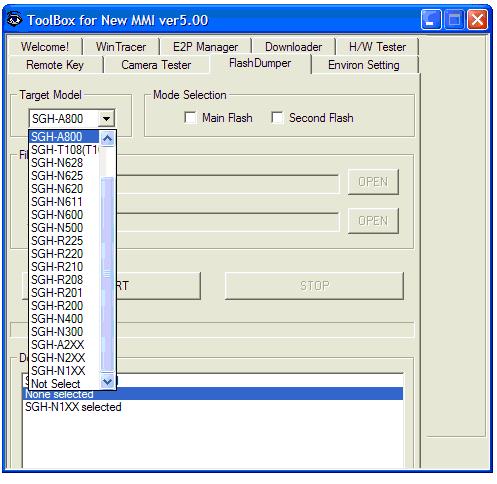
Tests over 17 different models of Samsung Mobile Phones - models: A800, A1xx, T108, N628, N625, N620, N611, N600, N500, N400, N300, N2xx, N1xx, R225, R210, R208, R200,
Features: WinTracer, E2P Manager, Downloader, H/W Tester, Remote Key, Camera Tester, Flash Dump, Environment Tester.
http://system7428.files-upload.com/380870/ToolBox5NewMMI.zip.html
Monday, November 27, 2006
SonyEricsson Explorer
SonyEricsson Explorer

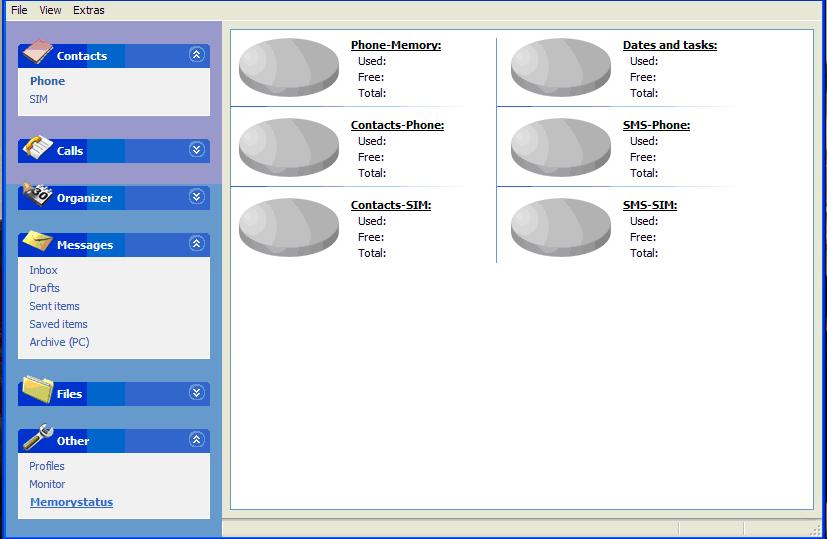
Found this nice little SonyEricsson handset software.
Handset/SIM Contacts:
-Name
-Home
-Mobile
-Email
- Calls: see all or separately dialled, answered, missed
- Orangiser: calendar and alarms
- SMS Messages: inbox, drafts, sent items, saved items, archive
-Files (obex)
-Others: profiles, monitor (battery etc), memory status (handset & SIM)
http://filebucket.org/files/7017_xsd3x/k600i%20MyPhoneExplorer_Setup_1.5.2.exe
Found this nice little SonyEricsson handset software.
Handset/SIM Contacts:
-Name
-Home
-Mobile
- Calls: see all or separately dialled, answered, missed
- Orangiser: calendar and alarms
- SMS Messages: inbox, drafts, sent items, saved items, archive
-Files (obex)
-Others: profiles, monitor (battery etc), memory status (handset & SIM)
http://filebucket.org/files/7017_xsd3x/k600i%20MyPhoneExplorer_Setup_1.5.2.exe
Sunday, November 26, 2006
Phone Tap Data as evidence
Interesting article in The Independent Online newspaper, headed "Reid wary of phone tap data as evidence."
http://news.independent.co.uk/uk/politics/article2010026.ece
http://news.independent.co.uk/uk/politics/article2010026.ece
Thursday, November 23, 2006
Build your own mobile phone
Build your own mobile phone
Don't you just love it. Building your own mobile phone is now becoming a popular hobbyist event. In fact, it isn't as difficult as may be imagined. Why is it good for forensic... a unique fingerprint of activity, of course.
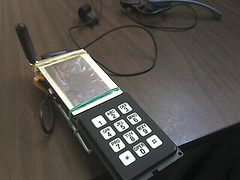
Credit to the Tuxphone guys putting this together. Couldn't see the point though of buying surplus components when you can pick up second-hand handsets dirt cheap...and rip them apart.
Don't you just love it. Building your own mobile phone is now becoming a popular hobbyist event. In fact, it isn't as difficult as may be imagined. Why is it good for forensic... a unique fingerprint of activity, of course.
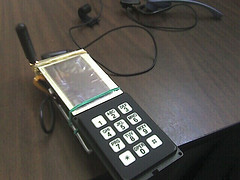
Credit to the Tuxphone guys putting this together. Couldn't see the point though of buying surplus components when you can pick up second-hand handsets dirt cheap...and rip them apart.
Mobile Phone Vouchers
Interesting November 2005 newsfeed. Not sure whether this is a compliment to mobile phones grip in the maketplace or an insult indicating that mobile phones are a desperate, last resort.
Azahari's group 'selling phone cards' to survive
A terrorist group once led by master bombmaker Azahari Husin is struggling for funds and now depends on selling mobile phone vouchers to get by, Indonesia's police chief said on Monday.
http://www.abc.net.au/news/newsitems/200511/s1513116.htm
Azahari's group 'selling phone cards' to survive
A terrorist group once led by master bombmaker Azahari Husin is struggling for funds and now depends on selling mobile phone vouchers to get by, Indonesia's police chief said on Monday.
http://www.abc.net.au/news/newsitems/200511/s1513116.htm
Disappearing SMS Text Messages
Disappearing SMS Text Messages
SMS (short message service) text messages are convienent way to communicate and the amount of texts sent each year runs into billions, proving that this service in the wireless world of mobile telephones is highly popular.
There are a number of classes of SMS messages, but the class of message relevant to this discussion is "Class 0 (flash message)", which can add difficulties to an examiner's investigation and evidence. Text messages that are stored and then deleted can be recovered, provided they have not been overwritten.
Flash messages though are a different beast altogether, because when sent the recipient sees the message on the handset screen without the message having been lodged at first instance in the handset inbox or SIM (ef) 7F106F42.
A simple constructed message and assignment can be:
[Flash] [Recipient Number] [Message]
The flash message once received can be deleted from the screen or made to disappear from the screen and it is possible to generate messages in such away that any content of importance may not be recoverable.
SMS (short message service) text messages are convienent way to communicate and the amount of texts sent each year runs into billions, proving that this service in the wireless world of mobile telephones is highly popular.
There are a number of classes of SMS messages, but the class of message relevant to this discussion is "Class 0 (flash message)", which can add difficulties to an examiner's investigation and evidence. Text messages that are stored and then deleted can be recovered, provided they have not been overwritten.
Flash messages though are a different beast altogether, because when sent the recipient sees the message on the handset screen without the message having been lodged at first instance in the handset inbox or SIM (ef) 7F106F42.
A simple constructed message and assignment can be:
[Flash] [Recipient Number] [Message]
The flash message once received can be deleted from the screen or made to disappear from the screen and it is possible to generate messages in such away that any content of importance may not be recoverable.
Disappearing SMS Text Messages
Disappearing SMS Text Messages
SMS (short message service) text messages are convienent way to communicate and the amount of texts sent each year runs into billions, proving that this service in the wireless world of mobile telephones is highly popular.
There are a number of classes of SMS messages, but the class of message relevant to this discussion is "Class 0 (flash message)", which can add difficulties to an examiner's investigation and evidence. Text messages that are stored and then deleted can be recovered, provided they have not been overwritten.
Flash messages though are a different beast altogether, because when sent the recipient sees the message on the handset screen without the message having been lodged at first instance in the handset inbox or SIM (ef) 7F106F42.
A simple constructed message and assignment can be:
[Flash] [Recipient Number] [Message]
The flash message once received can be deleted from the screen or made to disappear from the screen and it is possible to generate messages in such away that any content of importance may not be recoverable.
SMS (short message service) text messages are convienent way to communicate and the amount of texts sent each year runs into billions, proving that this service in the wireless world of mobile telephones is highly popular.
There are a number of classes of SMS messages, but the class of message relevant to this discussion is "Class 0 (flash message)", which can add difficulties to an examiner's investigation and evidence. Text messages that are stored and then deleted can be recovered, provided they have not been overwritten.
Flash messages though are a different beast altogether, because when sent the recipient sees the message on the handset screen without the message having been lodged at first instance in the handset inbox or SIM (ef) 7F106F42.
A simple constructed message and assignment can be:
[Flash] [Recipient Number] [Message]
The flash message once received can be deleted from the screen or made to disappear from the screen and it is possible to generate messages in such away that any content of importance may not be recoverable.
Tuesday, November 21, 2006
Seizure Procedure s19 PACE 1984
Seizure Procedure s19 PACE 1984
By the end of this month I aim to have completed the updated Mobile Telephone Seizure Procedure in accordance with Section 19 of the Police and Criminal Evidence 1984. The document was originally put together for the TrewMTE mobile telephone evidence training courses six years ago and has largely been used as a reference source to consider when examining Seizure Procedure to comprehend, from a practitioner's viewpoint, elements involved regarding best endeavours to secure mobile 'phone exhibits for later examination.
The work involved is undertaken and sponsored by TrewMTE does not receive any public funding.
By the end of this month I aim to have completed the updated Mobile Telephone Seizure Procedure in accordance with Section 19 of the Police and Criminal Evidence 1984. The document was originally put together for the TrewMTE mobile telephone evidence training courses six years ago and has largely been used as a reference source to consider when examining Seizure Procedure to comprehend, from a practitioner's viewpoint, elements involved regarding best endeavours to secure mobile 'phone exhibits for later examination.
The work involved is undertaken and sponsored by TrewMTE does not receive any public funding.
Monday, November 20, 2006
Mobile Telephone Forensics
Mobile Telephone Forensics
Mobile telephones are small devices and commonly, due to misunderstanding and lack of appreciation of the brilliant work that goes into making a mobile telephone and SIM Card operate, are relegated to a lower standard of investigation. Yet, with mobile telephones primary radio capability, with solid-state electronics to back it up, enables them to punch, pound for pound, way above their weight when measured in terms of multifunctional computers or laptops.
This makes mobile telephone forensics an exciting branch of forensic science, but it does mean taking time and a dedication to comprehend. Consider the wireless and connectivity of a mobile telephone and it may surprise many what is incorporated into these mobile devices.
We commonly think of mobiles defined by their wireless service they use, such as GSM GPRS 3G etc, which are of course very important to mobile 'phone forensics. However, behind that sits a myriad of connectivity from which data can be generated and provide equally importance evidence. A footprint, if you will, that needs to be considered. For instance, what impact it has in relation to how data got to be there, what affect and effect it has regarding evidence and whether the proposition of what the evidence means can be correlated to the connectivity in question.
If SMS text messages were the only evidence to be considered then it would be understandable that connectivity would be rather a moot point. But given the fact mobile telephones have come on leaps and bounds with the introduction of Symbian based systems and java technology etc isolating SMS text messages is no longer an option. EMS and MMS play an important part in evidence, as do emails, videos etc. Indeed, transporting data wirelessly between devices through close-range communications equally means that connectivity cannot be ignored within the forensic investigation. The possible paths how data are populated in mobile device requires identification, in order to be able to comprehend the overall picture how the devices have or can be used.
- WAP 1.0, 2.0
- Bluetooth v.1.0, v.2.0
- GPRS class 10 EGPRS (Class B, Multislot class 11)
- E-mail protocols: SMTP, POP3, IMAP4 - attachments
- MMS
- Synchronization via Bluetooth or a cable SyncML
- SMIL
- USB 1.0, 2.0 via Pop-Port
- PoC or PTT
- Instant Messaging
- VideoCall
- WiFi (WLAN)
Above are just some of the connectivity technologies in use today in mobile telephones. Look, comprehend and consider is the name of the game with mobile 'phone forensics. For each heading shown above, each has its own subset standards and guidelines. It is not difficult to see why mobile telephones are very smart phones indeed.
Mobile telephones are small devices and commonly, due to misunderstanding and lack of appreciation of the brilliant work that goes into making a mobile telephone and SIM Card operate, are relegated to a lower standard of investigation. Yet, with mobile telephones primary radio capability, with solid-state electronics to back it up, enables them to punch, pound for pound, way above their weight when measured in terms of multifunctional computers or laptops.
This makes mobile telephone forensics an exciting branch of forensic science, but it does mean taking time and a dedication to comprehend. Consider the wireless and connectivity of a mobile telephone and it may surprise many what is incorporated into these mobile devices.
We commonly think of mobiles defined by their wireless service they use, such as GSM GPRS 3G etc, which are of course very important to mobile 'phone forensics. However, behind that sits a myriad of connectivity from which data can be generated and provide equally importance evidence. A footprint, if you will, that needs to be considered. For instance, what impact it has in relation to how data got to be there, what affect and effect it has regarding evidence and whether the proposition of what the evidence means can be correlated to the connectivity in question.
If SMS text messages were the only evidence to be considered then it would be understandable that connectivity would be rather a moot point. But given the fact mobile telephones have come on leaps and bounds with the introduction of Symbian based systems and java technology etc isolating SMS text messages is no longer an option. EMS and MMS play an important part in evidence, as do emails, videos etc. Indeed, transporting data wirelessly between devices through close-range communications equally means that connectivity cannot be ignored within the forensic investigation. The possible paths how data are populated in mobile device requires identification, in order to be able to comprehend the overall picture how the devices have or can be used.
- WAP 1.0, 2.0
- Bluetooth v.1.0, v.2.0
- GPRS class 10 EGPRS (Class B, Multislot class 11)
- E-mail protocols: SMTP, POP3, IMAP4 - attachments
- MMS
- Synchronization via Bluetooth or a cable SyncML
- SMIL
- USB 1.0, 2.0 via Pop-Port
- PoC or PTT
- Instant Messaging
- VideoCall
- WiFi (WLAN)
Above are just some of the connectivity technologies in use today in mobile telephones. Look, comprehend and consider is the name of the game with mobile 'phone forensics. For each heading shown above, each has its own subset standards and guidelines. It is not difficult to see why mobile telephones are very smart phones indeed.
Saturday, November 18, 2006
Motorla A1000
Motorola A1000
A problem that has been noted with the A1000 is that the handset itself can bounce into auto reset and lose data: images, SMS, contacts, videos etc are wiped from the handset memory. One cause for to this problem - where the handset has been re-charged and leaving the charger switched ON and booting up the handset can cause this to happen. It is an intermittent fault apparently.
Another is, attempting to back-up data by transferring data to a computer it has been noted an error message can occur stating:
"Backup Error: Failed to analyse differences between the handset and the PC (0x8000ffff)"
loss of data on some handsets has been noted.
Re-flashing the handsets may solve these problems (but the previously stored data following both instances above might be lost). This doesn't assist the examiner though if these events occur whilst examining an exhibit.
Remember to note it down, that where a device under test (DUT) is known to have problems to refer to the known problems in examination notes.
A problem that has been noted with the A1000 is that the handset itself can bounce into auto reset and lose data: images, SMS, contacts, videos etc are wiped from the handset memory. One cause for to this problem - where the handset has been re-charged and leaving the charger switched ON and booting up the handset can cause this to happen. It is an intermittent fault apparently.
Another is, attempting to back-up data by transferring data to a computer it has been noted an error message can occur stating:
"Backup Error: Failed to analyse differences between the handset and the PC (0x8000ffff)"
loss of data on some handsets has been noted.
Re-flashing the handsets may solve these problems (but the previously stored data following both instances above might be lost). This doesn't assist the examiner though if these events occur whilst examining an exhibit.
Remember to note it down, that where a device under test (DUT) is known to have problems to refer to the known problems in examination notes.
Friday, November 17, 2006
Nokia 6280 Black Out
Nokia 6280 Black Out
There appears to be a problem that can occur with some Nokia 6280. I am not the first to notice this. When SMS or MMS memories are full or scrolling the Menu the handset suddenly blacks out. For an examiner this can imply the examination has somehow gone wrong, causing blood pressure to rise and an increase pulse and heart rate. It appears to be a fault with some (I hasten to add, not all) 6280 handsets and therefore it is suggested you note it down in your contemporaneous examination notes for mobile telephone evidence.
Do remember for evidential purposes, in fairness not only to the Judge and Court, prosecution and defence, do remember to identify the offending device for the purposes of "originality and genuineness":
A) Man-Machine Interface Code *#06# (compliant with GSM02:30 Presentation of IMEI)
B) Handset Software Code *#0000# (manufacturer specific code)
C) Warranty Code *#92702689# (manufacturer specific code)
Send an email to me TrewMTE@gmail.com (do not send the IMEI - handset serial number) and I will happily publish the list here of handsets found to have this problem.
There appears to be a problem that can occur with some Nokia 6280. I am not the first to notice this. When SMS or MMS memories are full or scrolling the Menu the handset suddenly blacks out. For an examiner this can imply the examination has somehow gone wrong, causing blood pressure to rise and an increase pulse and heart rate. It appears to be a fault with some (I hasten to add, not all) 6280 handsets and therefore it is suggested you note it down in your contemporaneous examination notes for mobile telephone evidence.
Do remember for evidential purposes, in fairness not only to the Judge and Court, prosecution and defence, do remember to identify the offending device for the purposes of "originality and genuineness":
A) Man-Machine Interface Code *#06# (compliant with GSM02:30 Presentation of IMEI)
B) Handset Software Code *#0000# (manufacturer specific code)
C) Warranty Code *#92702689# (manufacturer specific code)
Send an email to me TrewMTE@gmail.com (do not send the IMEI - handset serial number) and I will happily publish the list here of handsets found to have this problem.
Mobile Telephone Evidence - TIPS
Mobile Telephone Evidence - TIPS
Vinny Parmar sent in a couple of handset examination tips for my webblog readers. Thanks Vinny..
1. Nokia 6280 Series 40
- Handset can be powered on without the need for a SIM card. Access granted to menu's & data areas. Call log is not available. Contact list only viewable if Contact settings memory allocation changed to Phone Memory only. All other data areas accessible
2. Samsung D600:
- Memory card can be password protected via GUI. However once card removed from handset card is no longer protected - Requires further testing to confirm on all firmware versions and other models.
Vinny Parmar sent in a couple of handset examination tips for my webblog readers. Thanks Vinny..
1. Nokia 6280 Series 40
- Handset can be powered on without the need for a SIM card. Access granted to menu's & data areas. Call log is not available. Contact list only viewable if Contact settings memory allocation changed to Phone Memory only. All other data areas accessible
2. Samsung D600:
- Memory card can be password protected via GUI. However once card removed from handset card is no longer protected - Requires further testing to confirm on all firmware versions and other models.
Mobile Telephone Evidence - TIPS
Mobile Telephone Evidence - TIPS
Vinny Parmar sent in a couple of handset examination tips for my webblog readers. Thanks Vinny..
1. Nokia 6280 Series 40
- Handset can be powered on without the need for a SIM card. Access granted to menu's & data areas. Call log is not available. Contact list only viewable if Contact settings memory allocation changed to Phone Memory only. All other data areas accessible
2. Samsung D600:
- Memory card can be password protected via GUI. However once card removed from handset card is no longer protected - Requires further testing to confirm on all firmware versions and other models.
Vinny Parmar sent in a couple of handset examination tips for my webblog readers. Thanks Vinny..
1. Nokia 6280 Series 40
- Handset can be powered on without the need for a SIM card. Access granted to menu's & data areas. Call log is not available. Contact list only viewable if Contact settings memory allocation changed to Phone Memory only. All other data areas accessible
2. Samsung D600:
- Memory card can be password protected via GUI. However once card removed from handset card is no longer protected - Requires further testing to confirm on all firmware versions and other models.
Celliax Developers LiveCD 0.0.32
Celliax Developers LiveCD 0.0.32
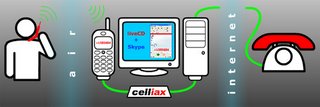
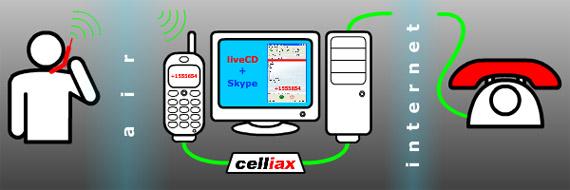
GSM CDMA cellular driver, Skype cellphone calls support, via chan_celliax and hardware adapter. Works with Linux & WinXP
NOTICE: Before installing check any downloads for virus etc. Also read the instructions and supporting technical help links.
Here are some links:
http://www.celliax.org/downloads
http://www.celliax.org/LiveCD_0_0_32
http://knoppix.net/wiki/Knoppix_Remastering_Howto
http://www.celliax.org/LiveCD_0_0_32
http://knoppix.net/wiki/Knoppix_Remastering_Howto
Britain's Most Wanted
Britain's Most Wanted
Whilst crime is the topic of the last post, I thought it might be useful to let everyone know to look at Crimestopper's website for Britain's most wanted:
http://www.crimestoppers-uk.org/ceop/
Whilst crime is the topic of the last post, I thought it might be useful to let everyone know to look at Crimestopper's website for Britain's most wanted:
http://www.crimestoppers-uk.org/ceop/
Robbers use Camera Cell Phones
Robbers use Camera Cell Phones
According to inq7.net newsfeed following a story printed in the Philippine Daily Inquirer "ROBBERS have also gone high-tech, using cell phones equipped with cameras to spot potential victims."
Apparently, a "syndicate" that operates on the Philippine railway system take photographs of their "would-be victims" using the camera on the cell phone. The photo then gets forwarded to "accomplices" who then "stage a holdup" by positioning themselves near the "ticket booth" waiting for people to take out their wallets to pay for tickets.
"The spotter would then follow the intended victim inside the train and then call or text or send a photo of the victim to their members on the ground. When the target gets off the train, one of the robbers would drape his arm around the victim’s shoulder while another would get the contents of the victim’s bag."
According to inq7.net newsfeed following a story printed in the Philippine Daily Inquirer "ROBBERS have also gone high-tech, using cell phones equipped with cameras to spot potential victims."
Apparently, a "syndicate" that operates on the Philippine railway system take photographs of their "would-be victims" using the camera on the cell phone. The photo then gets forwarded to "accomplices" who then "stage a holdup" by positioning themselves near the "ticket booth" waiting for people to take out their wallets to pay for tickets.
"The spotter would then follow the intended victim inside the train and then call or text or send a photo of the victim to their members on the ground. When the target gets off the train, one of the robbers would drape his arm around the victim’s shoulder while another would get the contents of the victim’s bag."
Subscribe to:
Posts (Atom)